
Your team is good at client work. So why does so much of the week disappear into status updates, report formatting, invoice chasing, and copying details from one tool to another?
For many agencies, that admin load grows quietly until it caps how many clients you can take on. Business automation for Newcastle digital agencies is about removing that drag, so your people can spend their time on strategy, creative work, and client relationships.
This guide covers what to automate first, how to start without breaking what already works, and what to look for if you bring in a specialist partner.
What Is Business Automation for Digital Agencies?
Business automation uses software to run repeatable tasks and workflows with little or no manual effort. For a digital agency, that usually means automating lead handling, client onboarding, reporting, approvals, and invoicing so work moves between people and tools on its own.
Think of it as the plumbing behind your agency. Clients rarely see good automation. They just notice faster replies, tidier reports, and fewer dropped balls.
It ranges from simple rules, such as “when a form is submitted, create a task,” to AI-assisted workflows that classify, draft, or summarise information for a person to review.
Why Business Automation Matters for Newcastle Digital Agencies
Many regional agencies run lean teams where one person wears several hats. That's great for speed and culture. It also means every hour of admin comes straight out of billable time or business development.
Clients don't compare you only with other local agencies, either. They compare you with remote and national agencies that respond fast and report clearly. Smooth operations are part of how you compete.
Here's what well-chosen automation tends to deliver:
More capacity without more headcount. Remove repetitive tasks and the same team can handle more clients.
Consistency. Every lead gets a prompt reply, and every client gets the same onboarding experience.
Fewer errors. Data copied by hand gets mistyped. Data passed along by a workflow doesn't.
Healthier margins. Retainer work costs less to deliver when reporting and updates don't eat hours.
A happier team. Few people joined a creative agency to reformat spreadsheets.
Which Agency Workflows Are Worth Automating?
The best candidates are tasks that happen often, follow clear rules, and carry low risk if something goes wrong. Start there, and leave judgement-heavy work to your people.
Workflow | Typical manual pain | What automation can do |
|---|---|---|
Lead capture | Enquiries sit in inboxes and replies are slow | Log the enquiry in your CRM, send an acknowledgement, alert the owner, and offer a booking link |
Client onboarding | Repeated emails and missed access requests | Trigger a welcome sequence, checklist, shared folders, and starter tasks |
Reporting | Hours spent pulling numbers into slides | Pull data from analytics and ad platforms into scheduled dashboards or draft summaries |
Content approvals | Feedback scattered across email and chat | Route drafts to reviewers, send reminders, and log sign-off |
Invoicing and time tracking | Late invoices and forgotten hours | Generate invoices from approved scope and send payment reminders |
Internal handoffs | “Who has this now?” | Create the next task and notify the next person when a stage completes |
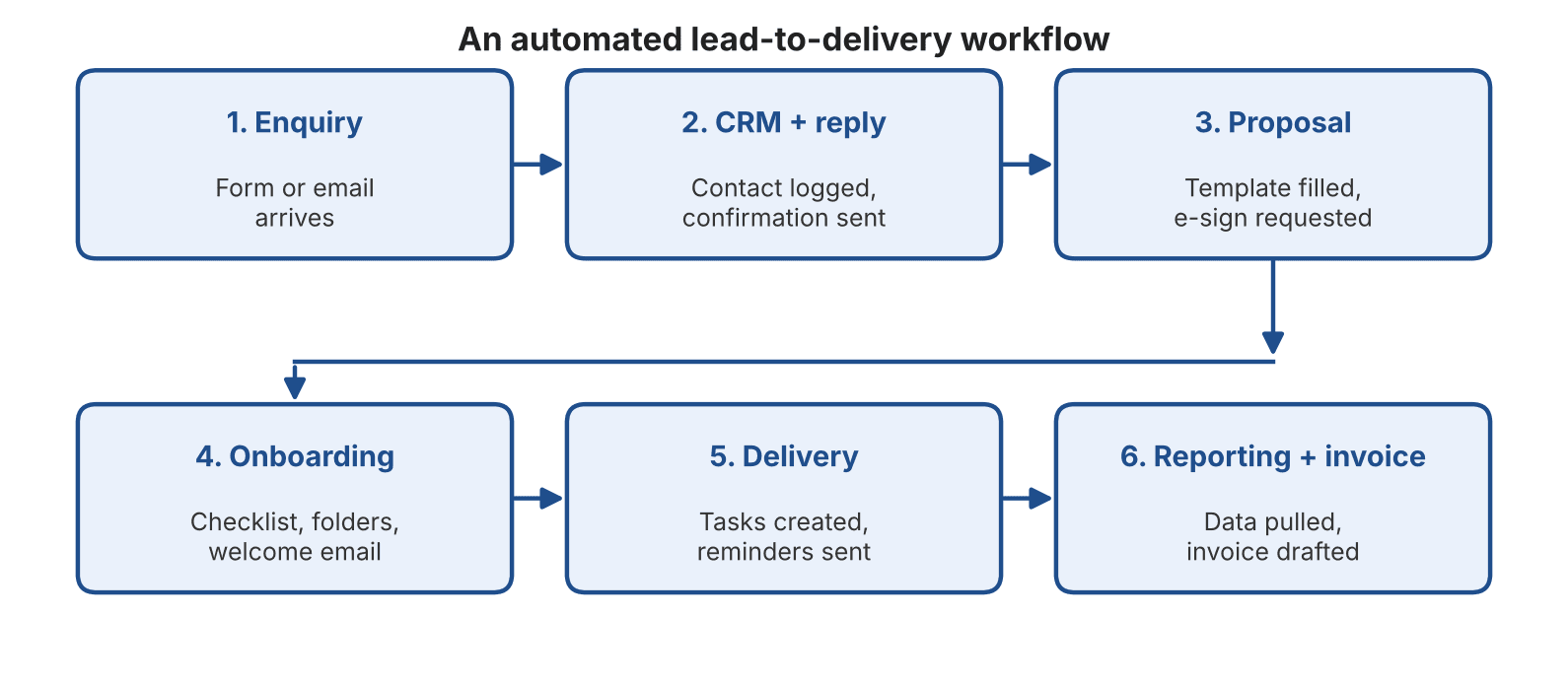
The chart below shows how these pieces can connect into one lead-to-delivery flow.
Start with lead handling and onboarding
These two areas usually give the quickest return, because they touch every new client.
For example: a prospect submits your contact form at 6pm. Automation logs them in your CRM, sends a confirmation with a booking link, and notifies the account lead. When your team logs on the next morning, the call is already booked.
Move on to reporting
Monthly reporting is the classic time sink. Connecting your data sources to a template means your team reviews and comments on the numbers instead of assembling them.
Keep people in the loop where judgement matters
Strategy, creative direction, and sensitive client conversations should stay human. Automation should prepare the ground and handle the follow-up, not replace the relationship.
How to Start Automating Your Agency Workflows
Start by mapping one workflow, tidying it up on paper, and then automating it with the simplest tool that works. Measure the result before you move on to the next process.
List your repetitive tasks. For one week, note every task your team repeats, from chasing approvals to updating spreadsheets.
Rank them by time and frustration. Pick the task that costs the most hours or causes the most errors.
Map the current process. Write down each step, who does it, and which tools are involved. You'll often spot steps that can simply be removed.
Fix the process first. Automating a messy workflow only makes the mess faster.
Choose the simplest tool that does the job. Many agencies already own software with built-in automation features.
Pilot, measure, then expand. Track hours saved, response times, and error rates. Use those numbers to decide what to automate next.
Common Automation Mistakes to Avoid
Automating before simplifying. Remove unnecessary steps first.
Tool sprawl. Five disconnected apps create new admin. Aim for a small stack that talks to itself.
No owner. Every automation needs someone responsible for maintaining it when tools or processes change.
Over-automating client contact. Clients should still feel they're dealing with real people.
Skipping data protection. Check where client data is stored and who can access it before connecting any new tool.
Build, Buy, or Partner: Which Route Fits Your Agency?
You have three realistic options, and the right one depends on how complex your workflows are and how much technical time you have in-house.
Option | Best for | Watch out for |
|---|---|---|
DIY with no-code tools | Simple, low-volume workflows and teams with a technically minded person | Fragile automations that nobody maintains |
Off-the-shelf platforms | Standard needs such as CRM, project management, and invoicing | Limited flexibility and tools that don't connect well |
Specialist automation partner | Multi-tool workflows, custom builds, and AI-assisted processes | Vague briefs; choose someone who takes time to understand agency work |
If your workflows span several tools, or you want AI-assisted steps, a specialist can save months of trial and error. The Muze Studios works with founders and business owners to design and build AI software products and intelligent automations, helping businesses scale their processes with technology.
For an agency, that could mean connecting your CRM, project management, and reporting tools into one workflow, or building a custom internal tool around the way your team already works.
What to look for in an automation partner
They map your existing workflow before proposing tools.
They start with one high-impact process rather than a big-bang rebuild.
They document what they build so your team isn't locked out.
They explain how client data is handled and secured.
They offer clear support after launch.
Frequently Asked Questions
What is business automation for digital agencies?
It's the use of software to handle repeatable agency tasks such as lead capture, onboarding, reporting, approvals, and invoicing. The goal is to cut manual admin so your team can focus on client strategy and creative work.
Is business automation worth it for Newcastle digital agencies?
Usually, yes, especially for lean teams where admin competes with billable work. Even a single automated workflow, such as lead follow-up or monthly reporting, can free up meaningful time each week.
Which agency tasks should I automate first?
Start with frequent, rule-based tasks like lead capture, client onboarding, and reporting. They're low-risk, easy to measure, and touch every client.
How much does business automation cost?
It varies with complexity. Simple no-code workflows may cost little more than a software subscription, while custom builds are typically priced per project. Scope, number of tools, and ongoing support all affect the final figure.
Will automation make my agency feel less personal?
Not if you use it well. Automate the routine follow-up and data handling, and keep conversations, strategy, and feedback in human hands.
Conclusion
Business automation for Newcastle digital agencies isn't about replacing people. It's about removing the repetitive work that stops good teams from doing their best work.
Begin with one workflow, simplify it, automate it, and measure the result. Then build from there.
If you'd rather not do it alone, get in touch with The Muze Studios to talk through your first workflow, or explore what the team does at themuzestudios.com.