
Orders are growing, but so is the pile of copy-and-paste work behind them. Someone still re-keys orders into your accounting system. Someone else checks stock in a spreadsheet. Your support inbox fills up with "where's my parcel?" emails.
If you're researching business automation for London e-commerce, you've probably reached the point where manual admin is capping your growth. Automation hands repetitive, rule-based work to software, so your team can focus on products, customers and strategy.
This guide covers what to automate, in what order, and how to roll it out without disrupting the orders you already have. You'll also get a simple framework for choosing between off-the-shelf tools and a custom build.
What Is Business Automation for E-Commerce?
Business automation for e-commerce means using software, integrations and AI to run repetitive tasks, such as order routing, stock updates, customer replies and reporting, without manual effort. A trigger or rule starts each task, so it happens the same way every time. The result is fewer errors, faster fulfilment and more time for work that needs human judgement.
Automation isn't one thing. It usually falls into three levels:
Rule-based workflows: "When an order is paid, create a pick list and email the customer a confirmation."
System integrations: Your storefront, warehouse or 3PL, accounting software and CRM share data automatically instead of relying on exports and uploads.
AI-assisted automation: Software categorises support tickets, drafts replies for review, flags risky orders or forecasts demand from sales history.
Most brands start at the first level and move up as their processes mature.
Why Business Automation Matters for London E-Commerce Brands
London brands face pressures that make manual work especially costly.
Higher operating costs. Staff, office and warehouse costs are high, so every hour spent on admin costs more.
Customers compare you instantly. Slow dispatch or slow replies show up in reviews, and shoppers can switch to a national marketplace in seconds.
UK compliance. Customer data falls under UK GDPR, and sales carry VAT obligations. Manual data handling makes mistakes more likely and harder to trace.
Seasonal spikes. A process that copes with a quiet week can collapse during Black Friday or a product launch.
Automation lets you handle more volume without growing admin headcount at the same rate. It also makes your operation more consistent, which matters when you're trying to build a brand people trust.
Where Business Automation Pays Off in E-Commerce
You can automate almost every part of the order lifecycle. These five areas usually deliver the clearest returns.
Area | Manual reality | Automated version |
Orders and fulfilment | Staff copy order details into shipping tools and email tracking numbers by hand. | Paid orders flow to your warehouse or courier, labels generate automatically and tracking updates reach customers. |
Inventory and suppliers | Stock counts live in spreadsheets and overselling is caught after the fact. | Stock syncs across channels, low-stock alerts fire and draft purchase orders are prepared for approval. |
Customer support | Agents answer the same status and returns questions all day. | Order-status replies are automatic, returns requests start themselves and AI drafts responses for a human to check. |
Marketing and retention | Campaigns are sent in batches from manual lists. | Abandoned-cart, post-purchase, back-in-stock and win-back messages trigger from customer behaviour. |
Finance and reporting | Sales, fees and refunds are reconciled at month end. | Transactions sync to accounting software daily and dashboards update on their own. |
Order processing and fulfilment
This is often the best starting point. Orders move from your storefront to your warehouse or fulfilment partner without anyone retyping them. That removes a common source of wrong-address and wrong-item errors.
Inventory and supplier management
If you sell across your own site and marketplaces, stock needs to stay in sync everywhere. Automated updates prevent overselling, and reorder alerts stop your best sellers from running out unexpectedly.
Customer support and returns
Most support tickets fall into a handful of repeat questions. Automate the routine ones and route the complicated cases to a person. If you build a returns workflow, make sure it tracks the cancellation and refund windows that UK consumer law sets for most online purchases.
Marketing and lifecycle messaging
Triggered emails and messages respond to what customers actually do, so they tend to feel more relevant than one-off blasts. Start with abandoned-cart and post-purchase flows before adding more segments.
Finance and reporting
Automatic syncing between your store, payment provider and accounting software cuts reconciliation time and keeps your numbers current. It also gives you a clearer view of margin by product or channel.
How to Decide What to Automate First
Trying to automate everything at once is the fastest way to stall. Instead, score each task on two questions:
Impact: How much time, money or customer frustration does this task cost you each week?
Effort: How hard is it to automate, considering your current tools, data quality and process complexity?
The matrix below shows how common e-commerce tasks tend to fall. Your own placement will differ based on your tools and volumes, so treat it as a starting point.
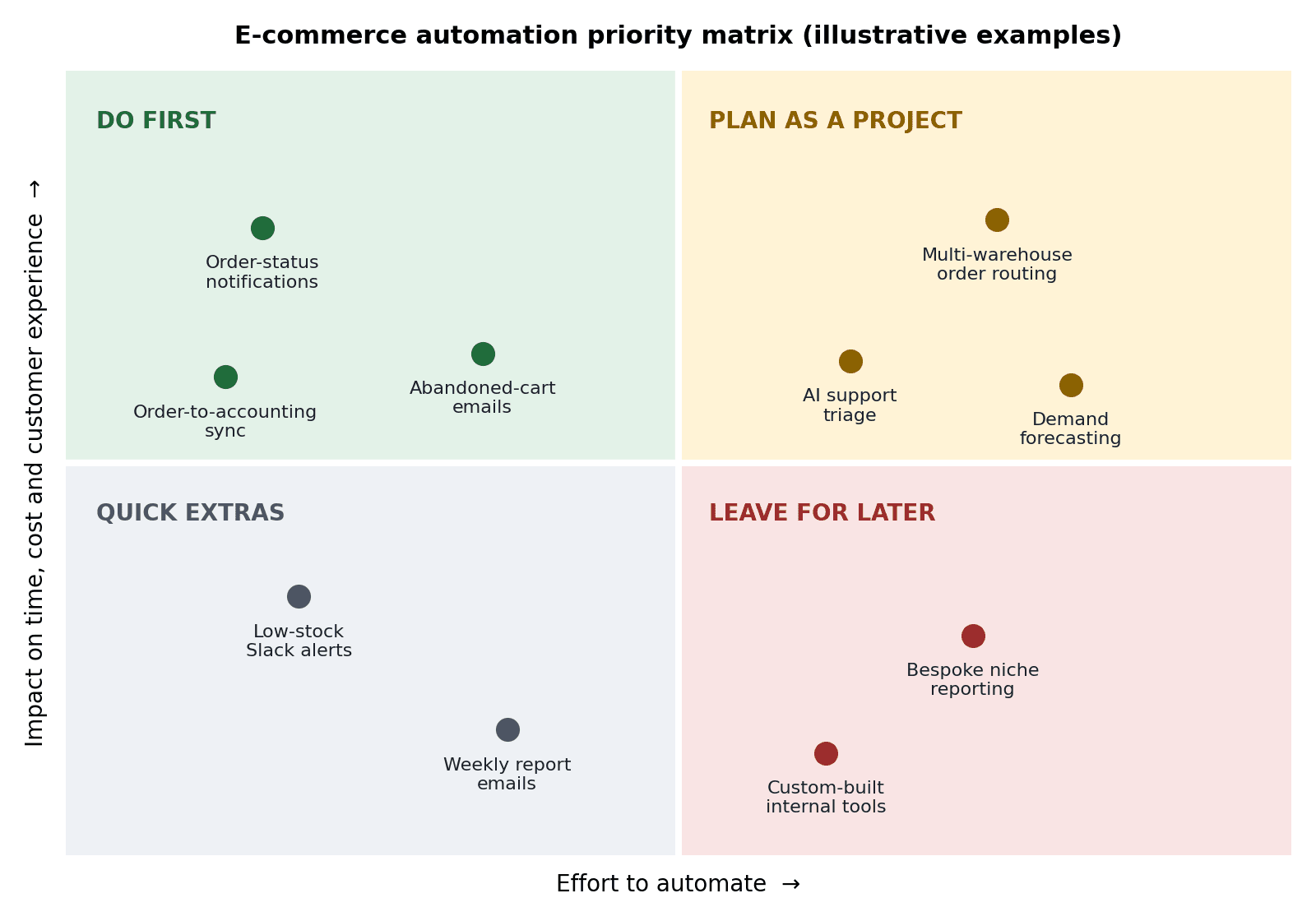
Begin in the "Do first" quadrant. Quick wins build confidence, free up time and give you evidence to justify bigger projects later.
How to Implement Business Automation Step by Step
Start by mapping one process, fix any problems on paper, then automate the smallest useful piece and test it with real orders. Expand only after you've measured the results. Working one workflow at a time keeps risk low and shows value quickly.
Map the process as it works today. Write down every step, tool and person involved, including the workarounds.
Fix before you automate. Automating a messy process only makes the mess faster. Remove unnecessary steps first.
Choose your tooling. Decide whether a no-code platform, a platform's built-in features or a custom build fits the job (see the comparison below).
Build the smallest useful version. Automate one trigger and one outcome, such as "order paid, then create shipping label."
Test with awkward cases. Try split shipments, partial refunds, discount codes, international addresses and out-of-stock items.
Keep humans in the loop where it matters. Require approval for high-value refunds or orders your system flags as risky.
Measure and expand. Track hours saved, error rates, dispatch time and first-response time, then move to the next workflow.
For example: A London homeware brand spends an hour each morning copying overnight orders into its courier portal. It automates that single handoff first. Once it runs cleanly for a few weeks, the team adds automatic tracking emails, then stock syncing. Each step is small, but together they remove a full daily task.
Off-the-Shelf Tools vs Custom Automation
Neither option is better in every case. The right choice depends on how standard your processes are and how many systems you need to connect.
Factor | Off-the-shelf or no-code tools | Custom-built automation |
Speed to launch | Fast for common workflows. | Slower, because it needs scoping and development. |
Flexibility | Limited to what the platform supports. | Shaped around your exact processes and systems. |
Upfront cost | Usually lower. | Usually higher. |
Ongoing cost | Subscription fees that often grow with volume or usage. | Hosting and maintenance, with fewer per-task fees. |
Best for | Standard flows like order notifications and simple syncs. | Complex logic, unusual integrations or AI-driven steps. |
Many brands use both. They begin with off-the-shelf tools, then commission custom work for the processes those tools can't handle well.
When to Bring In an Automation Partner
You can build simple automations in-house. But some situations call for outside help:
Your tools don't connect cleanly, and you rely on exports, uploads and workarounds.
You want AI-assisted steps, such as ticket triage or lead handling, and don't have technical staff to build them.
An earlier automation broke during a busy period and nobody on the team can fix it quickly.
If that sounds familiar, a specialist team can turn your process map into working software. The Muze Studios builds AI-powered automations and custom software for growing businesses, including workflows for lead generation, customer service and complex business processes.
Whoever you choose, look for these qualities:
A process-first approach. They should ask how your operation works before proposing tools.
Clear timelines and communication. You should always know what's being built and when.
Respect for your data. Ask how they handle customer information in line with UK GDPR.
Documentation and handover. You should understand what was built and be able to maintain it.
Support after launch. Automations need monitoring and updates as your business changes.
Common Mistakes to Avoid
Automating a broken process. Simplify first, then automate.
Trying to do everything at once. Small, staged rollouts are easier to test and fix.
Removing all human oversight. Keep review points for refunds, fraud flags and unusual orders.
Ignoring edge cases. Rare scenarios cause the most support tickets when they're not handled.
Skipping measurement. Without a baseline, you can't prove the automation worked.
Frequently Asked Questions
What is business automation for e-commerce?
It's the use of software and integrations to handle repetitive online-store tasks automatically. Examples include order routing, stock updates, customer notifications and financial reporting. It reduces manual errors and frees your team for higher-value work.
What should an e-commerce brand automate first?
Start with high-impact, low-effort tasks such as order-status notifications, abandoned-cart emails and syncing orders to your accounting software. These are usually easy to set up and show results quickly. Save complex projects, such as demand forecasting, for later.
How much does e-commerce business automation cost?
Cost depends on scope. Simple no-code workflows typically involve a subscription fee, while custom builds are priced by the work involved. Ask any provider for a scoped estimate based on your processes and the systems you need to connect.
Do I need a London-based provider for business automation?
Not necessarily. What matters is that the provider understands your tools, handles data in line with UK requirements such as UK GDPR and communicates clearly. Many automation projects are delivered remotely through calls and shared documentation.
Will automation replace my team?
Automation replaces repetitive tasks, not people. Most brands redirect staff time toward customer experience, merchandising and growth. Human review remains important for exceptions and decisions that need judgement.
Conclusion
Business automation works best when you approach it as a series of small, measurable improvements. Map one process, fix it, automate it, and measure the result. Do that a few times and manual admin stops being the ceiling on your growth.
If you'd like help turning your own processes into working automations, get in touch with The Muze Studios to talk through where to start.

