You've won the contract, or you're about to bid on one. Either way, the same problem shows up: the paperwork never stops. Tax compliance letters expire, bid forms need re-completing, progress reports wait on approvals, and invoices sit in someone's inbox.
Business automation for Pretoria government contractors targets that admin load directly. It won't win tenders for you, but it can stop small manual errors from costing you bids and delaying your payments.
This guide explains what business automation means in a contracting context, which workflows are worth automating first, and how to roll it out without disrupting live projects.
What Is Business Automation for Government Contractors?
Business automation uses software to carry out repeatable tasks, such as collecting documents, routing approvals, and sending reminders, without manual effort at every step. For government contractors, it means your tender, compliance, reporting, and invoicing processes run on consistent, trackable workflows instead of scattered spreadsheets and email threads.
The idea is broader than it sounds. Business process automation can be as simple as an automatic reminder when your tax compliance status is about to expire. It can also be a connected system where an approved progress report triggers an invoice draft.
Automation handles the repetitive work. People still make the decisions: whether to bid, how to price, and what to sign.
Why Pretoria Contractors Feel the Pressure
Pretoria is the administrative seat of South Africa's national government, so many national departments and state entities buy goods and services from here. That means plenty of opportunity, and plenty of competition from other local suppliers.
Four pressures come up again and again:
Strict documentation. A bid typically needs valid tax compliance status, B-BBEE proof, Central Supplier Database (CSD) details, company registration documents, and completed standard bidding forms. One expired or missing document can disqualify a submission.
Fixed deadlines. Tender closing dates don't move to suit your internal approvals.
Payment timelines. Government departments are generally expected to pay valid invoices within 30 days, so an incomplete or late invoice slows your cash flow.
Data protection. Staff and subcontractor records fall under POPIA, which makes careless file sharing a real risk.
Each of these is more a process problem than a people problem. That's exactly where automation fits.
Where Business Automation Delivers the Most Value
The contracting lifecycle has six broad stages. Automation can help at every one of them, though the payoff is largest where work is repetitive and errors are costly.
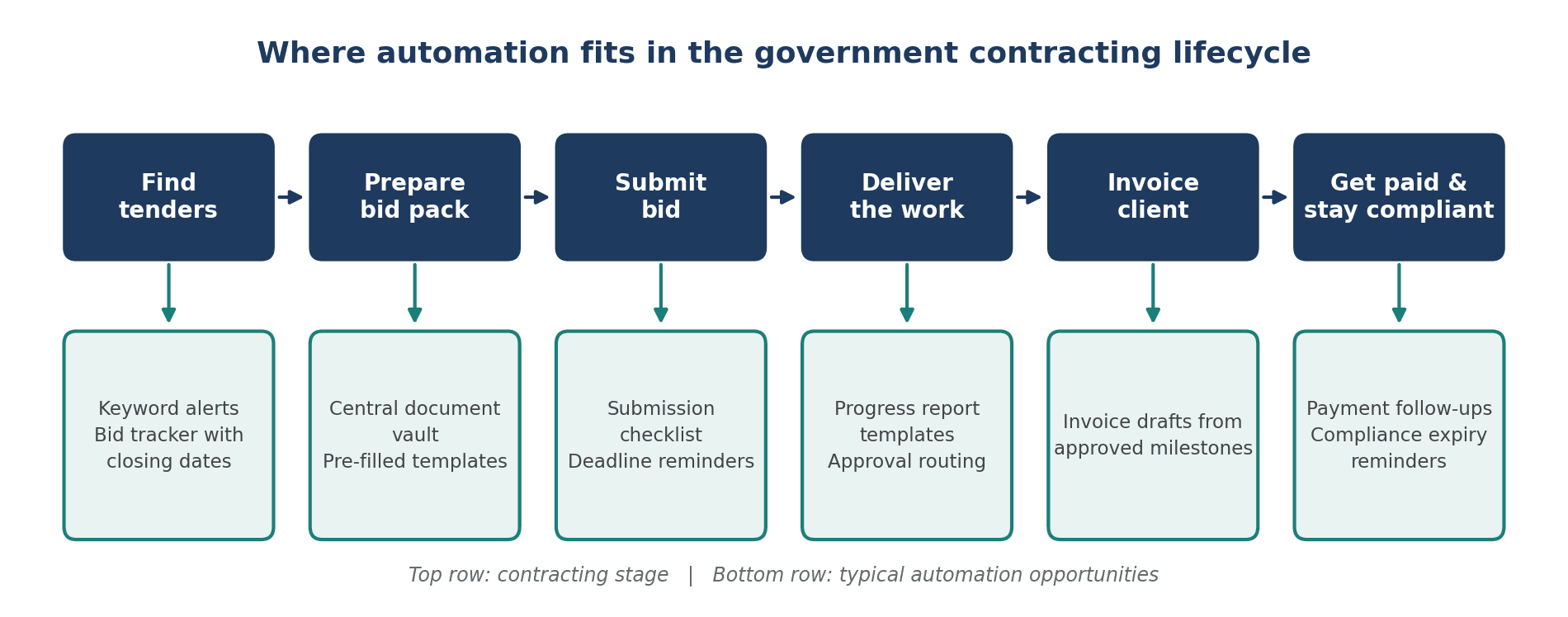
Figure 1: The government contracting lifecycle and typical automation opportunities at each stage.
Tender discovery and bid tracking
Published tenders appear on the National Treasury's eTenders portal and on individual department sites. Instead of checking them manually, you can set keyword alerts and log every opportunity in a single tracker with closing dates, briefing sessions, and internal deadlines.
Compliance document management
Keep every certificate, letter, and registration document in one central repository. Add expiry dates and have the system send reminders at 60, 30, and 14 days. When a bid opens, the current versions are already in one place.
Bid document assembly
Standard forms ask for the same company details again and again. Templates can pre-fill those fields, and a submission checklist confirms nothing is missing. A person should still review the final pack before it goes out.
Project reporting and approvals
Use standard report templates and route them to the right approver digitally. You get a clear audit trail showing who approved what and when, which helps if a query comes up later.
Invoicing and payment follow-up
Approved milestones can generate invoice drafts automatically. Scheduled follow-ups then remind your team to chase invoices as the 30-day mark approaches, rather than after it has passed.
Manual vs Automated: A Quick Comparison
The table below shows how common contracting tasks change once automation is in place.
Task | Manual approach | Automated approach | Main benefit |
|---|---|---|---|
Compliance expiry tracking | Someone remembers to check certificates and letters | Central register sends reminders before each document expires | Fewer disqualifications |
Bid pack assembly | Copy and paste company details into every form | Templates pre-fill standard details; a checklist confirms completeness | Faster, more consistent bids |
Progress report approvals | Reports travel by email and approvals get lost | Reports route to the right approver with a visible audit trail | Clear accountability |
Invoice follow-up | Finance chases payments when time allows | Invoices are drafted from approved milestones and follow-ups are scheduled | Steadier cash flow |
How to Start Automating Your Contracting Workflows
Start by mapping one process, fixing its obvious inefficiencies, and then automating it as a small pilot. Expand only after you've measured the results.
A phased approach keeps risk low and builds internal confidence. Here's a practical sequence:
Map the process end to end. Write down every step, who does it, and where delays happen. You'll often find steps nobody remembers adding.
Pick the highest-friction workflow. Score each candidate on frequency, error risk, and time spent. Compliance tracking and invoice follow-up often score high.
Standardise before you automate. Automating a messy process only makes the mess run faster. Agree on naming rules, templates, and approval owners first.
Choose tools that fit your setup. Look at what you already use, such as Microsoft 365, Google Workspace, or accounting software, before adding new platforms.
Pilot with one team or contract. Run the new workflow alongside the old one for a short period and collect feedback.
Measure and expand. Track hours spent per bid pack, missed deadlines, days from milestone to invoice, and days from invoice to payment. Then move to the next workflow.
A Practical Example
For example: Picture a Pretoria facilities maintenance contractor that bids on several tenders each quarter. Its compliance documents sit in different people's inboxes, and the bid coordinator spends the day before every deadline hunting for the latest versions.
After centralising those documents, adding expiry reminders, and building a reusable bid template, the coordinator starts each bid with a complete, current pack. The time goes into reviewing the bid and refining the pricing instead of chasing files. That's a hypothetical scenario, but it reflects the kind of shift well-planned automation can support.
What to Look for in an Automation Partner
You can build simple automations yourself. Once workflows involve several systems, sensitive data, or many staff, specialist help usually saves time. When you assess a partner, look for:
Process-first thinking. They should ask how your business works before recommending any tool.
Understanding of procurement realities. Compliance documents, tight deadlines, and payment cycles shouldn't need explaining from scratch.
Data security awareness. Your workflows will handle company and personal information, so POPIA matters.
Training and handover. Your team should be able to run the system without calling for help every week.
Room to grow. Start with one workflow, but make sure the foundation can support more.
The Muze Studios provides business automation services in Pretoria for government contractors. The team helps businesses map their existing workflows and turn the repetitive parts into dependable, automated systems, so staff can focus on winning and delivering contracts.
If you're not sure which of your workflows are ready for automation, you can contact The Muze Studios to talk through your situation and decide on a sensible first step.
Common Mistakes to Avoid
Automating a broken process. Fix the workflow first.
Removing human sign-off on submissions. Bids and contracts still need a person's review.
Adding too many tools at once. Every extra platform is another thing to learn and maintain.
Ignoring data security. Control who can see compliance records and personal information.
Leaving no owner. Every automated workflow needs someone responsible for keeping it accurate.
Frequently Asked Questions
What is business automation for government contractors?
It's the use of software to handle repeatable contracting tasks such as tracking compliance documents, assembling bid packs, routing approvals, and following up on invoices. The goal is fewer manual errors and more consistent processes across your tender and delivery cycle.
Which processes should Pretoria government contractors automate first?
Start with processes that are frequent and costly when they go wrong. Compliance document tracking and invoice follow-up are common first choices because missed expiry dates and late invoices directly affect bids and cash flow.
Will business automation help me win more government tenders?
Not directly, and no one can guarantee it. Automation reduces errors, speeds up bid preparation, and frees your team to focus on strategy and pricing, which can strengthen the quality of your submissions.
How much does business automation cost?
It depends on how many workflows you automate, which tools you use, and how much integration is needed. Simple automations built on software you already own cost far less than custom, multi-system solutions, and a good partner will scope the work after reviewing your processes.
Is it safe to automate documents that contain personal information?
It can be, provided you apply proper access controls and follow POPIA requirements. Choose systems that limit who can view records, keep an audit trail, and store data securely.
Conclusion
Government contracting rewards businesses that are organised, accurate, and on time. Business automation for Pretoria government contractors supports all three by taking repetitive work off your team's plate and making your compliance, reporting, and invoicing processes more reliable.
Start small: map one workflow, fix it, automate it, and measure the outcome. If you'd like experienced help doing that, The Muze Studios is ready to talk through your options.