
It's 9 pm. A customer is asking on WhatsApp whether a jacket is still in stock. Your Sandton shop shows one in size M, but your online store sold it an hour ago. Someone now has to check, apologise and issue a refund by hand.
If that sounds familiar, you're not short on effort. You're short on systems that talk to each other. Business automation for Johannesburg retail means letting software handle the repetitive work, such as stock updates, order messages and invoice capture, so your team can focus on customers and growth.
This guide explains what retail automation covers, which tasks to tackle first, and how to start without overspending or disrupting trading.
What Is Business Automation for Retail?
Business automation for retail is the use of software to complete repetitive tasks, like updating stock levels, sending order confirmations and capturing invoices, without manual effort. It connects your point-of-sale, online store, accounting and customer messaging so information moves on its own.
Think of it as a set of "if this happens, then do that" rules. If a sale is rung up in-store, then reduce the stock count everywhere. If an order ships, then message the customer with tracking details. If stock drops below a set level, then alert the buyer.
Automation isn't the same as replacing staff. It removes the copy-and-paste work that nobody enjoys and that causes most of the errors.
Why Johannesburg Retailers Are Turning to Automation
Retail in Johannesburg has its own pressures, and several of them make manual processes costly:
Multi-channel selling. Many retailers now sell in-store, through their own website, on social media and on marketplaces. Keeping stock accurate across all of them by hand doesn't scale.
WhatsApp as a service channel. Customers expect quick answers on the app they already use all day, including after hours.
Tight margins. When every rand counts, time lost to re-keying data and fixing mistakes eats directly into profit.
Unreliable power and connectivity. Interruptions are a known operating reality, so cloud-based systems that sync once you're back online are more resilient than paper trails and spreadsheets on one machine.
Which Retail Processes Can You Automate?
Most retailers get the best return from a handful of workflows. The table below shows where automation usually helps most.
Process | What it replaces | Problem it reduces |
|---|---|---|
Inventory sync | Counting and updating stock separately for each channel | Overselling, stock-outs, dead stock |
Order handling | Copying online orders into the POS or accounting system | Slow fulfilment, data-entry errors |
Customer messaging | Answering the same questions and sending status updates by hand | Missed enquiries, slow replies |
Invoicing and accounting | Capturing supplier invoices and matching payments | Month-end backlogs, reconciliation mistakes |
Reordering | Spotting low stock and emailing suppliers | Reactive buying, lost sales |
Reporting | Building sales summaries in spreadsheets | Late, inconsistent decisions |
Inventory and order sync
This is usually the biggest win. When a sale happens anywhere, your stock count updates everywhere. For example: a Rosebank homeware store sells a lamp on its website. The system deducts one unit from the shop floor count and flags the item for reorder when the quantity hits its minimum.
Customer messaging
Automated replies can handle opening hours, delivery areas, return policies and order-status questions on WhatsApp, email or your website chat. Anything complex still goes to a person, with the conversation history attached so the customer doesn't have to repeat themselves.
Finance and supplier admin
Invoice capture tools can read supplier invoices and push the details into your accounting software. Paired with sales data, they make month-end reconciliation far less painful.
How Do You Decide What to Automate First?
Start with tasks that are frequent, rule-based and error-prone. Those deliver the most relief for the least setup effort. Save complex, one-off or judgement-heavy work for later.
A simple way to score each task is to rate two things: how much time it costs your team each week (impact), and how hard it would be to set up (effort). The chart below shows how a typical independent retailer might plot common tasks. Your own scoring will differ, but the logic holds.
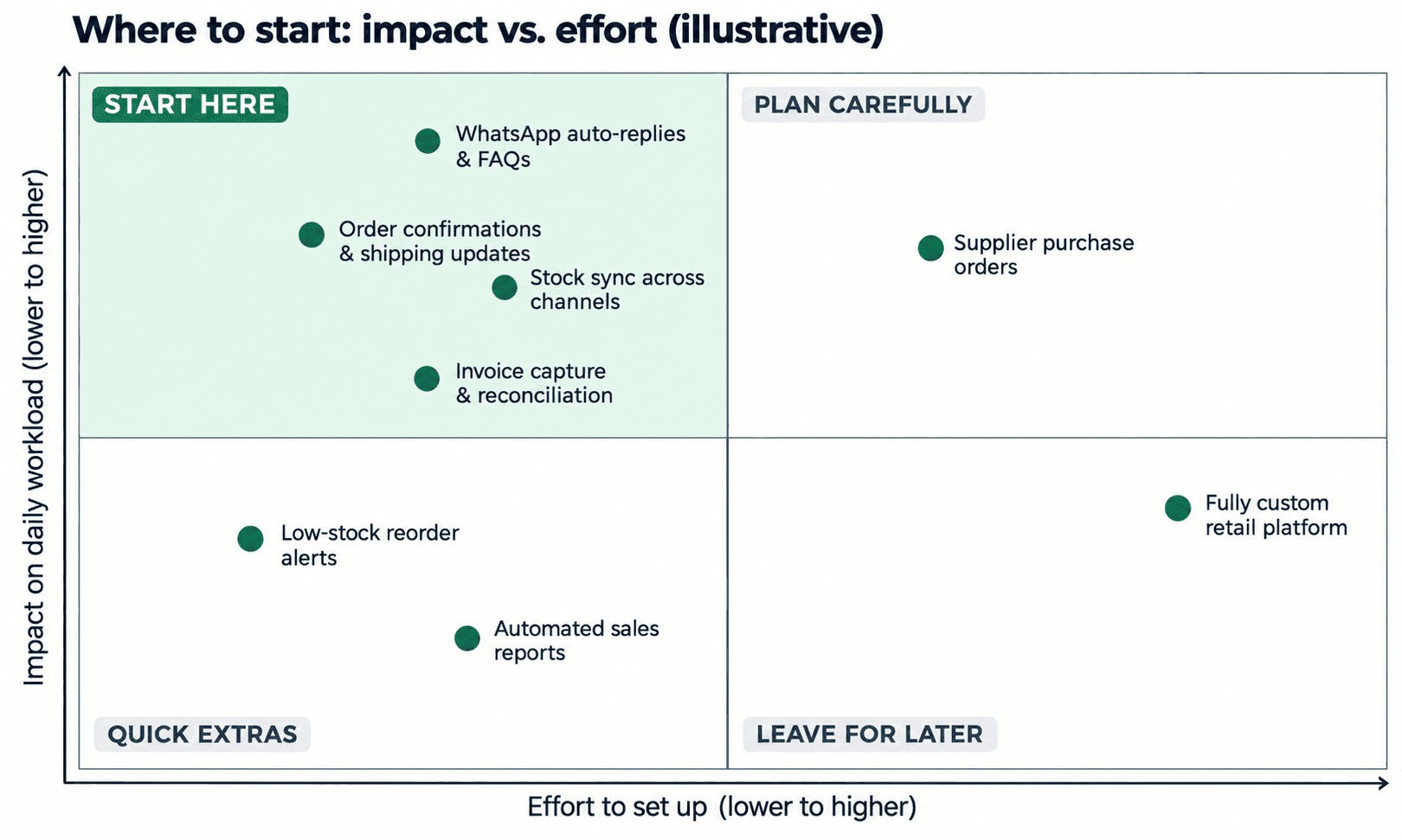
Tasks in the top-left corner, such as customer auto-replies, order notifications and stock sync, are where most stores should begin.
How to Start Business Automation in a Retail Business
Begin by mapping what your team does by hand each week, pick one or two high-impact workflows, and automate those before expanding. A small, working pilot beats a big plan that never launches.
List your manual tasks. Ask each team member what they repeat daily or weekly. Note how long each takes.
Score and shortlist. Use the impact-versus-effort approach above to choose one or two starting points.
Check your current tools. Your POS, e-commerce platform and accounting software may already offer built-in automations or integrations you aren't using.
Pilot on one workflow. Run it for a few weeks, compare time spent and error rates, and fix what doesn't work.
Document and expand. Once it's stable, write down how it works and move to the next workflow.
Common mistakes to avoid
Automating a broken process. Fix the process first, then automate it.
Buying a large platform before you've proven the need.
Leaving staff out of the planning. The people doing the work know where the friction is.
Forgetting a fallback. Decide what happens if an automation fails or the connection drops.
Don't Overlook POPIA When Automating Customer Data
Many automations handle personal information, from names and phone numbers to order histories. South Africa's Protection of Personal Information Act (POPIA) sets rules for how you collect, store and use that data.
In practice, that means getting proper consent before sending marketing messages, collecting only what you need, and limiting who can access customer records. It's sensible to confirm the details with a legal adviser before you launch anything customer-facing.
When Should You Bring in a Specialist?
Plenty of retailers can set up simple automations themselves using the tools they already pay for. Outside help becomes worthwhile when workflows span several systems, when data needs cleaning before it can sync, or when you simply don't have the time to build and test.
A specialist team such as The Muze Studios can help you map your processes, choose what to automate first and turn that shortlist into working workflows. If you'd rather talk through your own setup before committing to anything, you can contact The Muze Studios and describe where your team loses the most time.
Whoever you choose, ask for a clear scope, a pilot-first approach and a plan for what happens when something breaks.
Frequently Asked Questions
How much does business automation cost for a retail store?
Costs depend on scope. Simple automations built with tools you already use can cost little beyond a subscription, while custom integrations across several systems cost more. Start with one workflow and a clear scope to keep spending predictable.
Can a small Johannesburg shop benefit from automation?
Yes. Small teams often gain the most because each hour saved is a bigger share of the week. Automating order messages, stock updates or invoice capture can free up time without a large upfront investment.
Will automation still work during load shedding?
Cloud-based tools keep your data safe off-site and sync once power and connectivity return, so they cope better than systems on a single local machine. For in-store trading, pair them with backup power for your POS and router.
How long does it take to automate a retail workflow?
A simple workflow, like order confirmations, can often be running within days. Multi-system projects, such as syncing stock across a POS, website and accounting package, usually take several weeks once testing is included.
Conclusion
Business automation in Johannesburg retail isn't about adopting every new tool. It's about finding the repetitive tasks that drain your team's time, fixing them one at a time and measuring the result. Start with stock sync, customer messaging or invoice capture, run a small pilot and build from there.

