
If your consultants spend more time updating spreadsheets, chasing availability and rewriting the same emails than speaking to candidates and clients, you don't have a people problem. You have a process problem.
Business automation for recruitment agencies in Manchester is one of the most practical ways to fix that. This guide shows you which tasks to automate first, how to roll automation out without disrupting live desks, and what to check before you commit to a tool or a partner.
What Is Business Automation for Recruitment Agencies?
Business automation for recruitment agencies means using software, workflows and AI to handle repetitive tasks like CV screening, interview scheduling, candidate updates and data entry. It frees consultants to spend their time on relationships, negotiation and closing placements. The aim isn't to replace recruiters. It's to remove the admin that slows them down.
In practice, you'll see two types of automation:
Rule-based automation: "If this happens, do that." For example, when a candidate applies, they automatically receive an acknowledgement and are added to the right pipeline.
AI-assisted automation: Software that reads, summarises or drafts. For example, parsing a CV into structured fields or summarising a call into CRM notes.
Most agencies end up using a blend of both.
Why Manchester Recruitment Agencies Are Turning to Automation
Manchester's recruitment market is busy and varied. Agencies compete across digital and tech, finance, legal, healthcare, logistics and more. That competition shapes what clients and candidates expect from you.
Several pressures push agencies towards automation:
Speed matters. Clients want shortlists quickly, and strong candidates rarely wait around.
Teams are lean. Consultants often handle sourcing, business development and account management at once.
Admin eats billable time. Duplicate data entry across your ATS, CRM, inbox and spreadsheets adds up fast.
Candidate expectations are higher. People expect updates and quick replies, not silence.
Automation won't fix a weak offer or a poor client base. But it can give a good team more hours for the work that actually wins and fills roles.
Which Recruitment Tasks Should You Automate First?
Start with tasks that are repetitive, high-volume and rule-based, such as interview scheduling, candidate status emails, CV parsing and data syncing between systems. These carry the lowest risk and usually show the fastest return. Keep relationship-heavy work, like client calls and offer negotiation, in human hands.
The table below ranks common starting points by how easy they are to set up and how much they tend to help.
Task | What automation does | Setup effort | Likely payoff |
Interview scheduling | Checks availability, books the slot, sends reminders | Low | High |
Candidate status updates | Triggers emails when a candidate moves stage | Low | High |
CV parsing and data entry | Pulls details from CVs into your ATS or CRM | Low to medium | High |
Application screening | Applies knockout questions and flags matches for review | Medium | Medium to high |
Client and candidate reporting | Builds pipeline dashboards and weekly summaries | Medium | Medium |
Business development outreach | Sequences follow-ups and logs replies to the CRM | Medium | Medium |
Interview Scheduling
Scheduling is the classic time sink. A consultant emails a candidate, then the client, then the candidate again. Automated scheduling shows live availability, books the slot and sends reminders without anyone typing a word.
Candidate Communication
Silence damages your reputation. Automated acknowledgements, stage updates and feedback requests keep candidates informed. Keep the tone personal and let consultants step in whenever a conversation needs a human voice.
CV Parsing and Data Syncing
Retyping candidate details into more than one system creates errors and wastes time. Automation can read a CV, fill the right fields and keep your ATS and CRM aligned. That also gives you cleaner data for reporting.
Screening and Shortlisting
For high-volume roles, automation can apply basic criteria such as right to work, location, salary expectations or key skills. For example, a role that attracts a large volume of applications can be triaged into "strong match", "maybe" and "not a fit" for a consultant to review. The consultant still makes the decision.
The figure below shows where these tasks sit across a typical recruitment workflow.
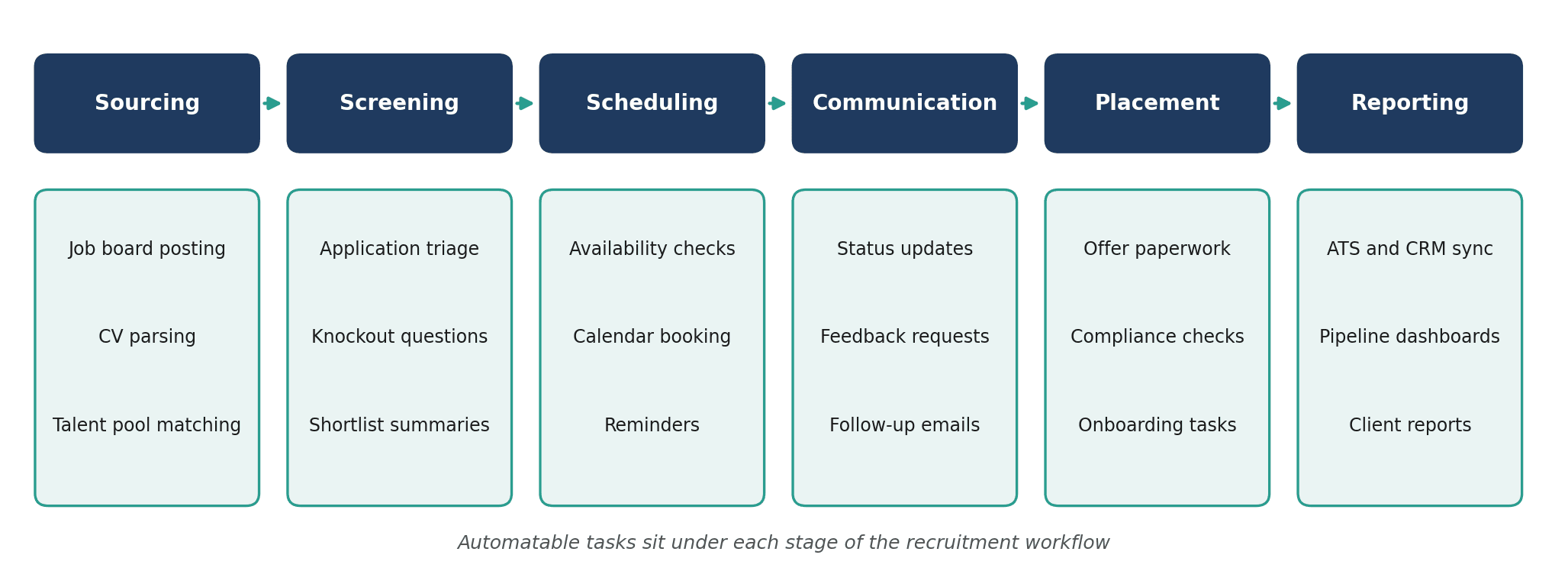
Figure 1: Where automation fits across the recruitment workflow
How to Implement Business Automation in a Recruitment Agency
Implement automation in small steps: map your current workflow, pick one or two bottlenecks, clean your data, choose a tool or build approach, pilot it with one team, then measure results before expanding. Rushing a firm-wide rollout is the most common way these projects stall.
Map your current process. Write down how a role moves from brief to placement, and note where people copy, paste, chase or wait.
Pick one or two bottlenecks. Choose the tasks that cost the most time or cause the most frustration. Don't try to automate everything at once.
Clean your data first. Automation amplifies whatever it's fed. Duplicate records and inconsistent fields will cause problems later.
Choose your approach. Decide whether your existing ATS features, no-code tools or custom-built automation fits best (see the next section).
Pilot with one desk. Test with a single team, gather feedback and fix issues before wider rollout.
Measure and expand. Track metrics such as time to shortlist, time to first response, consultant admin hours and candidate drop-off.
Build, Buy or Customise: Choosing the Right Approach
There's no single right answer. The best option depends on how standard your processes are and how many systems you need to connect.
Approach | Best for | Strengths | Limitations |
ATS built-in features | Agencies with standard workflows | Quick to switch on; no extra tools | Limited flexibility; tied to one vendor |
No-code workflow tools | Connecting a few common apps | Affordable; fast to test | Can get messy as workflows grow |
Custom automation | Bespoke processes and multi-system setups | Fits how you actually work; scales with you | Needs proper scoping and a capable build partner |
Many agencies start with built-in features, then add custom automation once they hit a limit.
What to Watch Out For: Compliance and the Human Touch
Recruitment involves a lot of personal data, so automation needs to respect UK data protection law. Before you automate anything that touches candidate data, check these points:
Lawful basis and retention. Know why you hold candidate data and how long you'll keep it.
Automated decisions. UK GDPR places limits on decisions made solely by automated means that significantly affect people. Keep a human reviewing screening outcomes.
Bias. Test screening rules to make sure they don't unfairly exclude groups of candidates.
Transparency. Tell candidates how their data is used, including any automated processing.
This isn't legal advice, so speak to a data protection professional if you're unsure. And remember that candidates are people. Automate the admin, not the relationship.
Where a Specialist Automation Partner Fits
Off-the-shelf tools handle common problems well. But if your agency runs bespoke processes, uses several systems, or wants automation built around the way your consultants really work, custom builds usually deliver more.
That's where a specialist team such as The Muze Studios can help. The team builds custom AI automations for lead generation, customer service, data analysis and complex business workflows. Those map neatly onto recruitment tasks like business development, candidate communication and reporting.
Frequently Asked Questions
How much does business automation cost for a recruitment agency?
Costs vary widely with scope. Built-in ATS features may already be in your subscription, no-code tools usually carry monthly fees, and custom builds are scoped as projects. Starting with a small pilot lets you test the value before spending more.
Will automation replace recruiters?
No. Automation handles repetitive admin like scheduling, data entry and routine updates. Judgement, relationship-building and negotiation still need people.
What should a recruitment agency automate first?
Start with interview scheduling, candidate status updates and data syncing between your ATS and CRM. These tasks are repetitive, rule-based and low risk, so they usually deliver value quickly.
Is it legal to use AI to screen candidates in the UK?
Using AI to support screening is generally possible, but UK GDPR limits decisions made solely by automated means that significantly affect individuals. Keep a human involved in outcomes, test for bias and be transparent with candidates.
How long does it take to see results from recruitment automation?
A focused workflow, such as scheduling or candidate updates, can often go live within a few weeks. Larger multi-system projects take longer, so pilot first and expand once you've seen the results.
Conclusion
Business automation works best in recruitment when it targets the right tasks. Start with repetitive, rule-based work, clean your data, pilot small and keep humans in charge of decisions and relationships. Done well, it gives your consultants more time to speak to clients and candidates.
If you'd like to turn this into a practical plan for your agency, you can contact The Muze Studios to talk through which workflows would be worth automating first.

