
Your dispatcher re-types the same order into two systems. Your finance team chases proof of delivery for days before an invoice can go out. Your customer service inbox fills with "where's my load?" emails.
None of this is unusual. It's also fixable. If you're exploring business automation for a Manchester logistics operation, this guide explains what automation actually covers, which processes pay off first, and how to roll it out without disrupting the work that keeps freight moving.
What Is Business Automation for Logistics Companies?
Business automation for logistics means using software to handle repeatable tasks, such as order entry, document processing, status updates and invoicing, with little or no manual input. It connects the systems you already use so data moves between them on its own, and your team steps in only for exceptions.
Automation isn't one product. It's a set of approaches, and most logistics firms use a mix:
Workflow automation: rules that trigger actions, such as sending a delivery alert when a driver marks a stop complete.
System integration: connecting your transport management system (TMS), warehouse management system (WMS), accounting package and customer portals so data flows between them.
Document processing: extracting data from PDFs, emails and scanned PODs instead of typing it in.
Robotic process automation (RPA): software "bots" that copy data between systems that don't connect directly.
The goal isn't to remove people from the process. It's to stop skilled staff spending their day on copy-and-paste work.
Why Manchester Logistics Firms Are Investing in Automation
Greater Manchester sits at the centre of a busy freight network. Trafford Park, Port Salford, Manchester Airport and the M60 and M62 corridors put a lot of operators within a short drive of each other. That means plenty of competition, and customers who can switch carriers easily.
A few pressures push local firms toward automation:
Customers expect visibility. Retailers and manufacturers want live tracking and proactive updates, not phone calls.
Admin work scales faster than revenue. More shipments usually means more paperwork, and more people to handle it.
Customs and trade documents add complexity for firms moving goods to and from the EU.
Hiring is hard. Automating routine admin lets you grow without adding headcount at the same rate.
Errors are expensive. A mistyped address or a missing POD can delay payment or trigger a dispute.
Which Logistics Processes Should You Automate First?
Start with tasks that are frequent, rule-based and prone to error. These are the processes where automation saves the most time with the least risk. Here's how common logistics tasks look before and after.
Process | What it looks like manually | What automation does |
Order intake | Orders arrive by email or PDF and get re-keyed into your system | Extracts order data and creates the job automatically, flagging gaps for review |
Customer status updates | Staff answer "where is my load?" calls and emails | Sends milestone alerts and tracking links triggered by real events |
Proof of delivery (POD) | Paper or photo PODs chased, scanned and filed by hand | Captures PODs, matches them to the job and attaches them to the invoice |
Invoicing and reconciliation | Staff match jobs, rates and PODs across spreadsheets | Builds invoices from completed jobs and highlights mismatches |
Customs and shipping documents | Repeated data entry across forms and portals | Pre-fills documents from shipment data and checks required fields |
Reporting | Weekly spreadsheets compiled from several systems | Pulls data into one live view of on-time performance and margin |
How to Prioritise Using Effort and Impact
Not every task deserves automation straight away. Plot each candidate by how much effort it takes to implement and how much impact it has on cost, speed or customer experience.
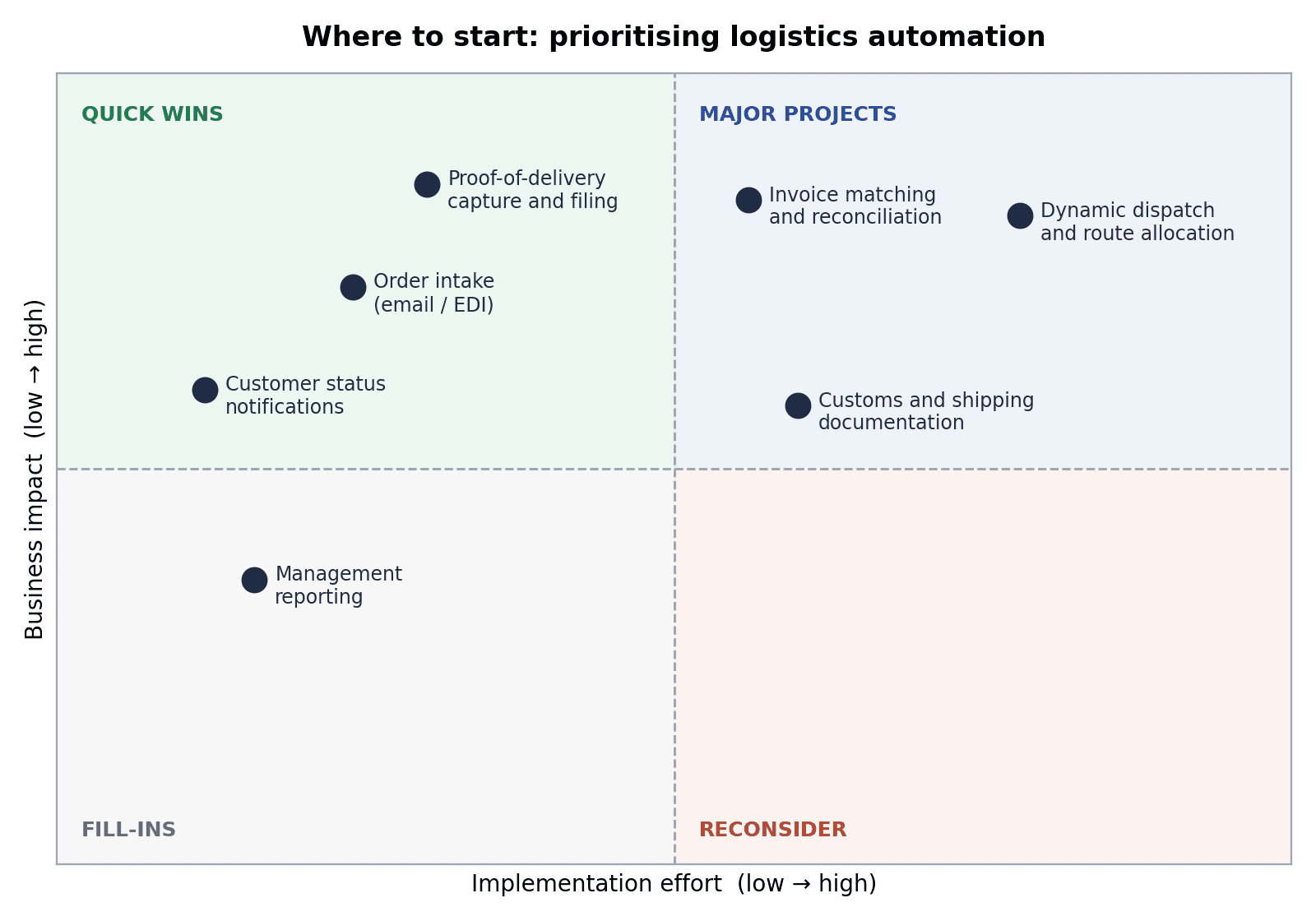
Illustrative placement. Your own ranking will depend on your volumes, systems and customer requirements.
Tasks in the top-left are your quick wins. Customer status updates and POD handling often fall here because the rules are clear and the tools are mature. Dynamic dispatch sits in the top-right: valuable, but it needs clean data and careful change management, so it's better tackled once the basics are working.
How to Implement Business Automation in a Logistics Company
Start by mapping one process end to end, find where manual steps and errors cluster, and automate that single process first. Pilot it with one team or customer, measure the result, then expand. Small, proven steps beat a big-bang rollout.
Map the current process. Write down every step, system and person involved, from the moment an order arrives to the moment payment lands.
Find the friction. Look for re-keying, waiting, chasing and rework. These are your automation candidates.
Pick one process. Choose something frequent and well understood. Avoid starting with your most complex or most politically sensitive workflow.
Check your systems. Confirm what your TMS, WMS and accounting software can already do. Many have integration options you aren't using.
Run a pilot. Test with a single depot, team or customer. Keep a manual fallback in place while you learn.
Measure and expand. Track time saved, error rates, invoice turnaround and customer queries. Use the results to justify the next project.
For example: a Manchester third-party logistics (3PL) provider receives most orders as emailed PDFs. Staff key each one into the TMS, then email the customer a confirmation. An automation project could read the PDF, create the job, flag unusual requests for review and send the confirmation automatically. Staff only handle the exceptions, so order volumes can grow without a matching rise in admin hours.
Common Mistakes to Avoid
Automating a broken process. If the workflow is confusing manually, automation will only make the confusion faster. Fix the process first.
Ignoring data quality. Automation relies on consistent addresses, rates and product codes. Messy data causes messy results.
Skipping the people side. Dispatchers and drivers need to understand what's changing and why. Involve them early.
Buying tools before defining the problem. Start with the outcome you want, then choose the technology.
Trying to do everything at once. A series of small wins builds confidence and funding for larger projects.
What to Look for in a Business Automation Partner in Manchester
Plenty of logistics teams can handle a simple automation in-house. Once you're connecting several systems, or you don't have spare technical capacity, a specialist partner can save time and avoid costly missteps.
When you compare options, look for a team that:
Takes time to understand your operation before recommending tools.
Works with the systems you already use rather than pushing a full replacement.
Starts with a focused pilot and agrees clear measures of success.
Explains what it's building in plain language and documents it properly.
Is easy to reach and available for support after launch.
If you want help turning a process map into a working automation plan, The Muze Studios is one team to consider. Working with a specialist can help you move from identifying the problem to putting a practical solution in place.
Frequently Asked Questions
What is business automation for logistics companies?
It's the use of software to carry out repeatable logistics tasks, such as order entry, tracking updates, document handling and invoicing, without manual effort. It connects your existing systems so information moves automatically and staff focus on exceptions.
What logistics tasks can be automated?
Common candidates include order intake, customer status notifications, POD capture, invoicing, customs and shipping documentation, and management reporting. Tasks that are frequent, rule-based and error-prone are the best starting point.
How much does business automation cost for a logistics company?
Cost depends on how many processes you automate, how many systems need connecting and how much custom work is involved. A focused pilot on a single process usually costs far less than a multi-system integration, which is why starting small is common.
Do I need to replace my TMS or WMS to automate?
Usually not. Many automation projects work alongside your existing systems by connecting them through integrations or workflow tools. A replacement is only worth considering if your current system can't be connected or no longer fits how you operate.
How long does it take to see results from automation?
A small, well-defined automation can often be live within weeks, while larger integrations take longer. Timelines depend on data quality, system access and how quickly your team can test and approve the changes.
Conclusion
Business automation works best in logistics when it starts small and solves a real bottleneck. Map one process, automate the repetitive steps, measure the outcome and build from there. For Manchester operators facing tight margins and rising customer expectations, that approach turns admin time into capacity.
If you'd like to talk through where automation could help in your operation, you can contact The Muze Studios to discuss your workflows and next steps.

