
Every clinic manager in Greater Manchester knows the feeling. The phones ring while the front desk checks patients in, referral letters pile up, and someone is still chasing appointment reminders by hand. None of it is clinical work, yet all of it eats into the time your team could spend with patients.
That’s the problem business automation in Manchester healthcare settings is designed to solve. This guide explains what clinic automation actually covers, which tasks to tackle first, how to handle patient data responsibly, and how to choose a partner who can build it properly.
What Is Business Automation for Healthcare Clinics?
Business automation for healthcare clinics means using software to handle repeatable administrative tasks, such as booking, reminders, patient intake and invoicing, with little or no manual effort. It doesn’t replace clinical judgement. It removes the routine work around care so your staff can focus on patients.
There are two broad types. Rules-based automation follows fixed instructions: if a patient books an appointment, send a confirmation and an intake form. AI-assisted automation handles messier inputs, such as reading a free-text enquiry, working out what the patient needs and routing it to the right person.
Clinical decisions stay with your clinicians. The best automation projects focus on administration, communication and data entry.
Why Manchester Clinics Are Prioritising Automation
Whether you run a GP practice, a physiotherapy clinic, a dental surgery or a private diagnostic service, the pressures look similar. Patients expect to book at 10pm from their phones. Teams are stretched. Admin grows faster than headcount.
Common triggers for automation include:
Heavy phone and inbox load. Reception teams spend hours on routine questions and rescheduling.
Missed appointments. Every empty slot is lost capacity and lost revenue for private clinics.
Duplicated data entry. Staff retype the same details across booking, records and billing tools.
Inconsistent processes across sites. Each location handles the same task slightly differently.
Rising patient expectations. People now expect instant confirmations, reminders and digital forms.
Which Clinic Tasks Can You Automate?
Most clinics can automate far more than they expect. The table below covers the most common starting points.
Task | What automation does | What it frees up |
Appointment booking | Offers online booking that syncs with your calendar and handles rescheduling | Reception phone time |
Reminders and no-show follow-up | Sends SMS or email reminders and offers a rebooking link if the patient cancels | Fewer empty appointment slots |
Patient intake and forms | Sends digital forms before the visit and flags anything missing | Waiting-room paperwork |
Enquiry handling | Sorts website, email and chat enquiries, answers common questions and passes complex ones to staff | Inbox time |
Referral and document processing | Pulls key details from referral letters and files them in the right place | Manual data entry |
Invoicing and payment chasing | Creates invoices and sends payment reminders on a schedule | Admin and accounts time |
Reporting | Compiles weekly figures on bookings, cancellations and waiting times | Spreadsheet work |
For example: picture a three-practitioner physiotherapy clinic. A patient books online and instantly receives a confirmation and an intake form. They get a reminder 48 hours before the visit, and a follow-up afterwards with a prompt to rebook. Reception only steps in when something falls outside the normal flow.
Where to Start: A Simple Prioritisation Framework
Don’t try to automate everything at once. Score each idea on two things: how much admin it removes, and how hard it is to implement. Then start where impact is high and effort is low.
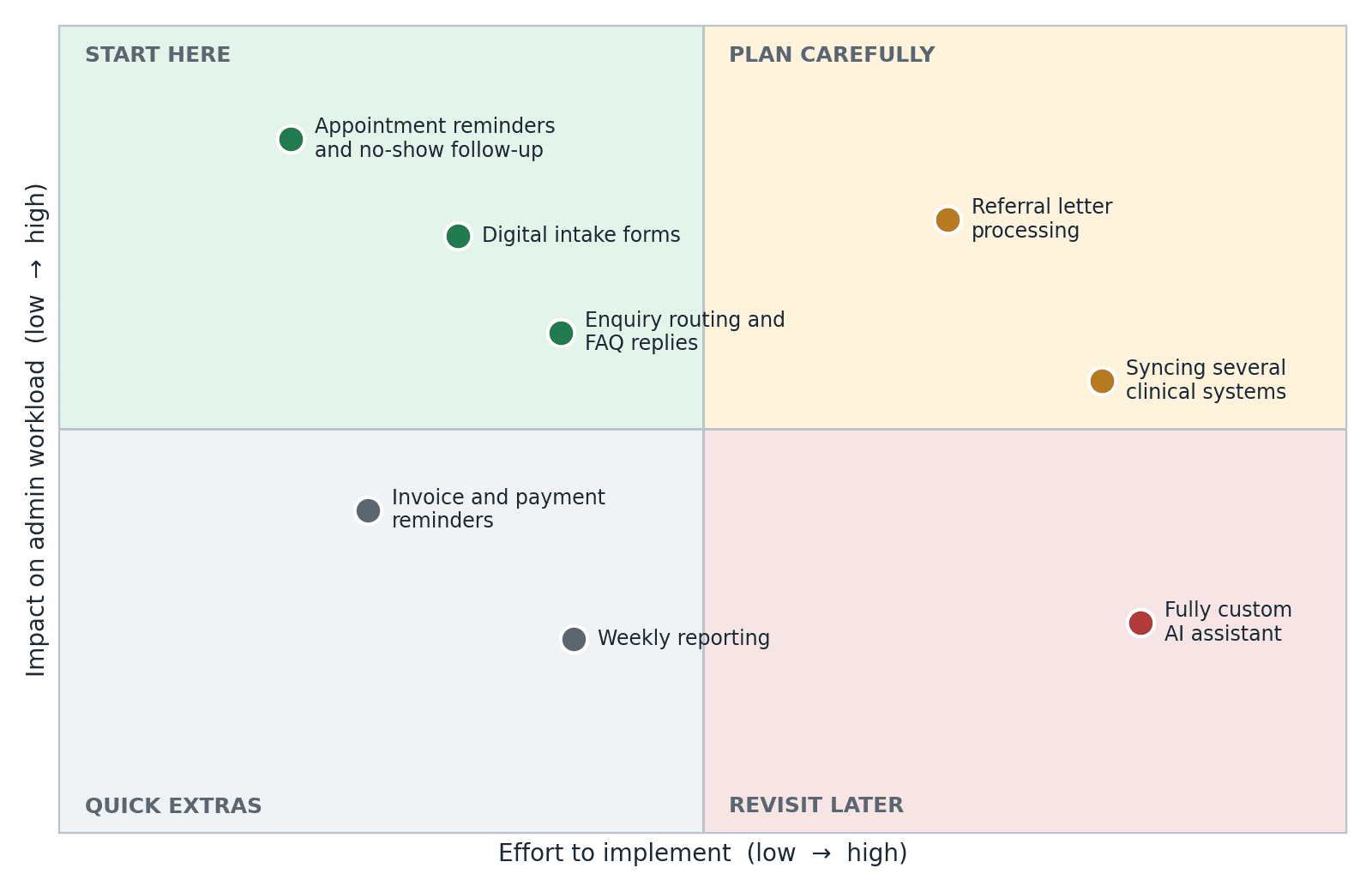
For most clinics, reminders, intake forms and enquiry routing sit in the “start here” zone. They use well-understood workflows, touch limited data and show results quickly.
Tasks like referral processing or syncing several clinical systems deliver strong value too, but they need more planning, testing and integration work. Treat them as phase two.
How to Implement Business Automation in a Healthcare Clinic
Start by mapping one painful workflow, set a measurable goal, build a small automation, test it with real staff, and expand only once it works. Rolling out one workflow at a time keeps risk low and gives your team time to adapt.
Map the current workflow. Write down every step, who does it and where delays happen. You can’t automate a process you can’t describe.
Set a measurable goal. For example, cut no-shows, reduce time spent on reschedule calls, or answer enquiries within an hour.
Check data and compliance first. Confirm what patient data the workflow touches and how it will be protected (more on this below).
Build small and test. Launch a limited version, run it alongside the manual process and fix problems before going live.
Train staff and plan for exceptions. Every automation needs a clear route to a human when something doesn’t fit.
Review and expand. Check results monthly, then move to the next workflow.
Data Protection: What Manchester Clinics Need to Get Right
Health information is classed as special category data under UK GDPR, so it needs extra care. Any automation that handles patient details must be designed with that in mind from day one.
Key points to cover before you go live:
Lawful basis and condition for processing. Be clear on why you process each type of patient data.
Data protection impact assessment (DPIA). New technology that processes health data will often call for one.
Supplier agreements. Any provider handling patient data for you should work under a written data processing agreement.
Access controls and audit trails. Limit who can see what, and keep a record of activity.
Hosting and data location. Know where patient data is stored and who can reach it.
Patient transparency. Update your privacy notice so patients know how their data is used.
If your clinic delivers NHS-commissioned services, you may also need to consider the Data Security and Protection Toolkit and clinical safety requirements for health IT. This is general information rather than legal advice, so confirm your obligations with your data protection officer or legal adviser.
Choosing a Business Automation Partner
Clinics generally choose between three routes. The right one depends on how unusual your workflows are and how many systems need to talk to each other.
Approach | Best for | Watch out for |
Built-in features of your clinic software | Standard needs such as basic reminders and booking | Limited flexibility, and tools that don’t share data |
No-code automation tools | Simple, low-risk workflows between common apps | Handling sensitive data, complex logic and long-term maintenance |
Custom-built automation | Unique workflows, several connected systems or AI-assisted tasks | Higher upfront investment, so choose your builder carefully |
Whichever route you take, ask every provider these questions:
How do you store and protect patient data, and where is it hosted?
Can you integrate with our current booking and patient management systems?
What happens when the automation fails or can’t answer a request?
Who maintains and monitors it after launch?
Have you built automations for healthcare or other regulated settings?
If custom automation looks like the right fit, a specialist team such as The Muze Studios can help. The team builds AI automations and custom software for growth-ready businesses, with healthcare among the industries it works in, covering areas like customer service, lead generation and complex business processes.
Common Mistakes to Avoid
Automating a broken process. Fix the workflow first, then automate it.
Starting too big. Large, multi-system projects stall. Prove value with one workflow.
Leaving staff out. Your reception and admin teams know where the real bottlenecks are.
Skipping the human fallback. Patients should always be able to reach a person.
Treating compliance as an afterthought. It’s far cheaper to design for data protection than to retrofit it.
Frequently Asked Questions
How much does business automation cost for a healthcare clinic?
It depends on the number of workflows, the systems involved and whether you use existing tools or a custom build. Simple automations on tools you already own can be inexpensive, while custom builds are usually scoped as projects. Ask for a quote tied to one specific workflow so you can compare options fairly.
Is clinic automation compliant with UK GDPR?
It can be, provided it’s designed with data protection in mind. That means a clear lawful basis, appropriate security, a written agreement with any supplier handling patient data and, often, a DPIA. Your data protection officer or legal adviser should sign off the details.
Which clinic tasks should I automate first?
Start with high-volume, low-risk admin: appointment reminders, digital intake forms and routine enquiry routing. They’re quick to set up, easy to measure and don’t touch clinical decisions.
How long does it take to implement business automation in a clinic?
A single, well-defined workflow can often go live within a few weeks, including testing. Projects that connect several systems or use AI to process documents take longer. Phasing the work keeps early wins coming while bigger pieces are planned.
Will automation replace my reception team?
No. Automation takes over repetitive tasks, which frees your team for work that needs empathy and judgement, such as helping anxious patients or handling complex scheduling. Good setups always include a clear handover to a person.
Conclusion
Business automation works best in healthcare when it’s targeted. Pick one admin-heavy workflow, set a clear goal, protect patient data from the start and keep humans in the loop. Do that well, and the benefits show up quickly in your team’s time and your patients’ experience.
If you’d like to talk through which workflows to automate first in your clinic, you can get in touch with The Muze Studios to discuss your requirements.

