
If your consultants spend more time updating records, chasing documents and rekeying CV details than speaking to candidates and clients, you don't have a talent problem. You have a systems problem.
Business automation for recruitment agencies in Leeds fixes that by handing repetitive, rules-based admin to software. Your team keeps the work that actually fills roles: building relationships, advising clients and judging fit.
This guide explains what automation means in a recruitment context, which tasks to tackle first, how to roll it out without disrupting live desks, and what you should always keep in human hands.
What Is Business Automation for Recruitment Agencies?
Business automation for recruitment agencies means using software to complete repeatable tasks, such as CV parsing, candidate follow-ups, interview scheduling and compliance chasing, without manual effort. It connects the tools you already use so data moves between them on its own. The goal is to free consultants for relationship-led work, not to replace them.
Most agencies already own the building blocks: an applicant tracking system (ATS) or CRM, email, job boards, and a payroll or timesheet tool. Automation is the layer that links them.
When a candidate applies, a workflow can parse the CV, create the record, check for duplicates, send an acknowledgement and alert the right consultant. Nobody retypes anything.
That's different from simply buying more software. A new ATS stores data. Automation moves it and triggers actions around it. Many agencies get more value from connecting what they have than from replacing it.
Why Leeds Recruitment Agencies Are Prioritising Automation
Leeds has a busy, competitive recruitment market, shaped by the city's strength in financial and professional services, legal, digital and technology, and healthcare. Agencies often chase the same candidates for the same clients, so small delays cost placements.
Several pressures push agencies towards automation:
Speed to submit. The agency that gets a strong CV in front of a client first often holds the advantage.
Margin pressure. Admin-heavy desks cost more to run for every placement.
Compliance workload. UK GDPR, right-to-work checks and record keeping add admin to every placement.
Candidate expectations. People expect quick replies and clear updates. Silence loses them to a competitor.
Consultant retention. Few people join recruitment to copy and paste.
Automation won't repair a weak sales process. It will remove friction from a good one.
Which Recruitment Tasks Should You Automate First?
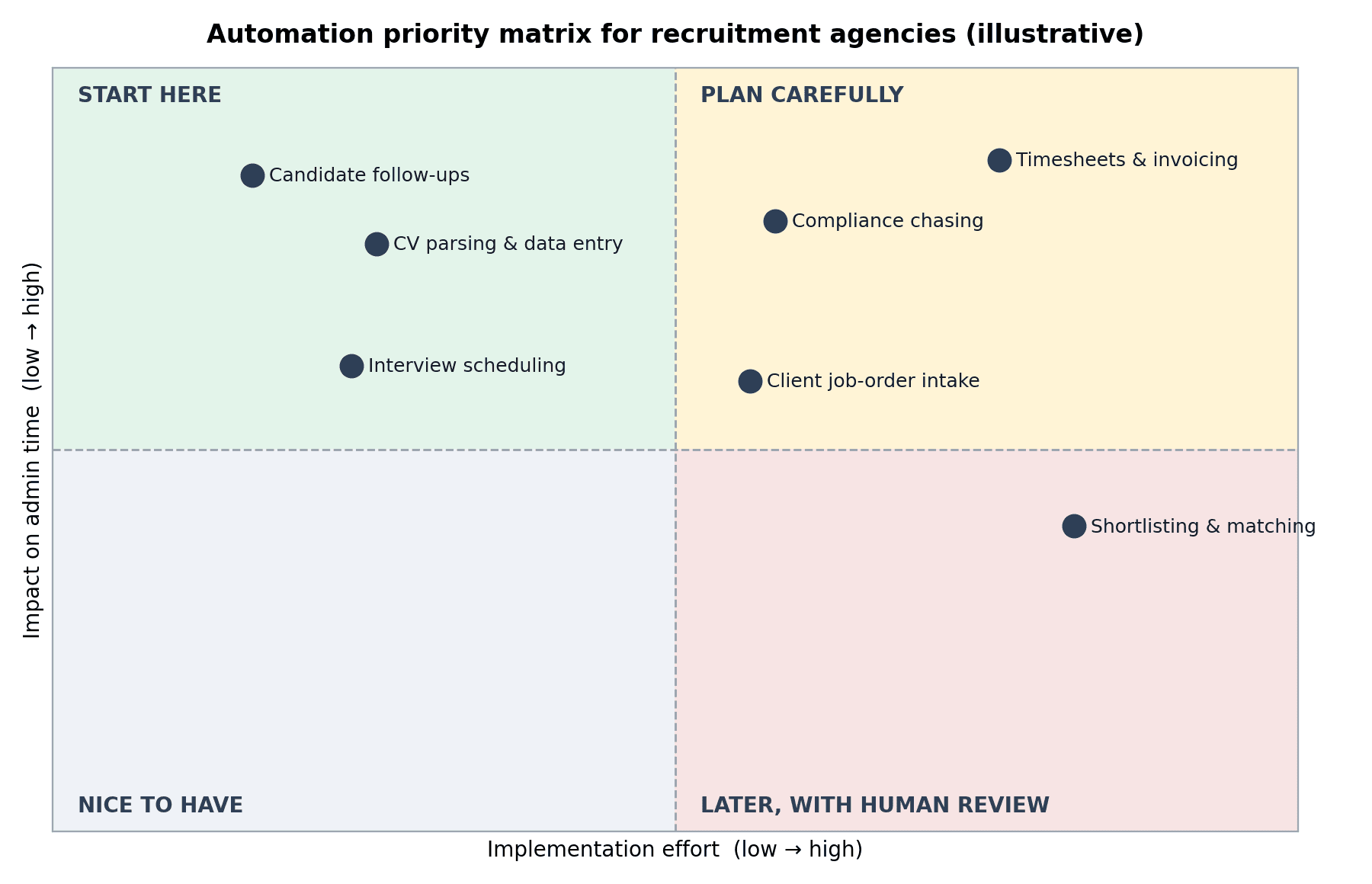
The best candidates for automation are tasks that happen often, follow clear rules and carry low risk if something goes slightly wrong. This table shows how common recruitment tasks compare.
Task | What automation does | Effort | Impact |
CV parsing and data entry | Extracts details, creates records, flags duplicates | Low | High |
Candidate follow-ups | Sends acknowledgements, status updates and reminders | Low | High |
Interview scheduling | Offers slots, confirms bookings, sends reminders | Low to medium | Medium to high |
Compliance chasing | Requests documents, logs consent, flags expiries | Medium | High |
Client job-order intake | Captures briefs, creates vacancies, alerts consultants | Medium | Medium |
Timesheets and invoicing | Collects approvals, builds invoices, syncs payroll | Medium to high | High |
Shortlisting and matching | Ranks candidates against criteria for human review | High | Medium |
The chart below plots the same tasks by effort and impact. Placement will vary by agency, but the pattern holds: start in the top-left, where the effort is low and the payoff is high.
CV Parsing and Candidate Data Entry
This is the classic quick win. Parsing tools pull names, contact details, work history and skills into structured fields. Add a duplicate check and your database stays cleaner, which makes every later search more reliable.
Candidate Communication and Scheduling
Acknowledgements, application updates and interview reminders follow predictable patterns. Automating them keeps candidates informed and cuts no-shows, while consultants focus on the conversations that need a human voice.
Compliance and Document Chasing
Chasing right-to-work documents, signed terms and consent records eats hours. A workflow can request each item, remind the candidate, log what arrives and flag anything expiring. It also creates a consistent audit trail.
For example: A candidate for temporary admin roles applies at 4:45pm. An automated workflow parses the CV, creates the record, texts a link to upload documents and offers interview slots. When the consultant opens their laptop the next morning, the candidate is already ready to speak to.
Timesheets, Invoicing and Payroll Handoffs
For agencies placing temporary and contract workers, weekly timesheet and invoice cycles create a lot of repeated work. Automated approvals, invoice generation and payroll syncing reduce errors and speed up payment, though this takes more effort to set up.
How to Automate Recruitment Processes Step by Step
Start by mapping your current workflow, pick one high-volume task, automate it using the tools you already have, test it with a small team, then measure and expand. Staged rollouts work better than a big-bang change because live desks can't afford disruption.
Map the process as it really works. Sit with consultants and resourcers. Note every handoff, copy-paste and chasing email.
Choose one use case. Pick something frequent and rules-based. Candidate acknowledgements are a common first project.
Check your data. Duplicates and inconsistent job titles will break workflows. Clean them up before you automate.
Build and connect. Use the integrations your ATS or CRM already offers. Where there are gaps, use a workflow platform or custom development.
Pilot with one desk. Run it for a few weeks and collect honest feedback from the people using it.
Measure what matters. Track time to submit, time to first candidate reply and admin hours per placement.
Expand and maintain. Job boards, APIs and regulations change. Someone needs to own the workflows after launch.
What Should Stay Human?
Automate the admin, not the judgement. Recruitment depends on trust, and some moments need a person.
Shortlisting and rejection decisions. Automated screening can repeat bias found in historical data. UK data protection law also limits solely automated decisions that significantly affect people, so keep a human in the loop.
Sensitive conversations. Offers, feedback and counter-offers need empathy and context.
Client relationships. Software can log a call. It can't read a hiring manager's hesitation.
Data protection choices. Automation should enforce your retention rules and consent records, not bypass them.
If you're unsure whether a workflow meets your data protection duties, take specialist advice before you switch it on.
Choosing a Business Automation Partner in Leeds
You can build workflows in-house if you have a technical lead with time to spare. Most agencies don't, so they look for outside help. When you compare options, check that a partner:
Understands recruitment workflows, not just generic automation.
Works with your existing ATS and CRM rather than pushing a full replacement.
Explains how candidate data is handled in plain language.
Documents what it builds, so you aren't locked in.
Offers ongoing support once the workflows go live.
Is happy to start with a small, clearly scoped pilot.
If you want help turning a process map into working workflows, a specialist team such as The Muze Studios can help you move from planning to implementation. Whoever you choose, ask for a scoped pilot first so you can judge the results before you commit further.
Frequently Asked Questions
How much does business automation cost for a recruitment agency?
Costs depend on scope. Simple workflows built on your existing tools can be modest, while custom integrations across several systems cost more. A scoped pilot is the safest way to get a realistic figure before you commit.
Will automation replace recruitment consultants?
No. Automation handles repetitive admin such as data entry, reminders and document chasing. Consultants still build relationships, negotiate and make judgement calls that software can't.
Do I need to replace my ATS to automate recruitment processes?
Usually not. Most modern ATS and CRM platforms connect with other tools, so you can automate around the system you already use. Replacement only makes sense if your current platform can't integrate or no longer fits your needs.
Is automated candidate communication compliant with UK GDPR?
It can be, if you have a lawful basis, tell candidates how you use their data, honour opt-outs and apply retention rules. Marketing messages carry extra rules, so check your setup with a data protection specialist.
How long does it take to automate a recruitment workflow?
A single, focused workflow can often go live within a few weeks, depending on data quality and the systems involved. Wider programmes are best delivered in stages.
Conclusion
Business automation works best in recruitment when it targets the right tasks: frequent, rules-based and low risk. Start with one workflow, clean your data, pilot it on a single desk and measure the result before you scale.
Keep people in charge of judgement, relationships and sensitive decisions. Let software handle the rest, so your consultants can spend their time on placements.
If you'd like to talk through which workflows would help your agency first, you can get in touch with The Muze Studios team to discuss your setup and goals.

