
Your solicitors didn't spend years training to chase signatures, re-key client details or update the same matter status in three places. Yet in many practices, that's where a good part of the week goes.
Business automation for Edinburgh law firms means handing that repetitive admin to software, so your team can spend its time on advice, advocacy and clients.
This guide explains what automation looks like in a legal practice, which workflows to tackle first, how to protect confidentiality and compliance, and how to roll it out without disturbing live matters.
What Is Business Automation for Law Firms?
Business automation for law firms means using software to complete repeatable, rule-based tasks, such as client intake, document drafting, deadline reminders and billing, with little manual effort. Solicitors still make the judgement calls. The system handles the steps around them.
It helps to separate three layers, because they carry different levels of risk:
Rule-based workflows: "if this happens, do that" steps, such as sending an ID request when a new matter opens.
Document assembly: templates that fill themselves from matter data.
AI-assisted tasks: sorting inbound emails, summarising long documents or flagging missing information for a person to review.
Automation isn't about replacing lawyers. It's about removing the copy-and-paste work that sits between a client enquiry and the moment a solicitor can actually help.
Why Edinburgh Firms Feel the Admin Pressure
Edinburgh has a busy, varied legal market. The Court of Session sits here, and firms serve everything from private client and property work to commercial and financial clients. Many practices are boutique or mid-sized, which means the back office is thin and fee earners often absorb the admin themselves.
Scots law adds its own wrinkles. Conveyancing runs on missives, titles are registered with Registers of Scotland, and court procedure differs from the rest of the UK. Many generic legal tools are built around English and Welsh practice, so you'll want to check that any system fits the way your team actually works.
A few pressures push firms toward automation:
Clients expect quick replies and regular updates.
Compliance work, including anti-money laundering checks, UK GDPR duties and Law Society of Scotland expectations, adds steps to every matter.
Fee pressure makes unbillable admin hard to justify.
Hybrid working exposes processes that only ever lived in one person's head or inbox.
Which Law Firm Workflows Are Worth Automating First?
Start where volume is high and the risk is low. Tasks that follow the same steps every time are the best candidates. Tasks that need legal judgement belong with your solicitors.
The chart below shows one way to rank candidates. The placements are illustrative and will shift depending on your firm's systems and practice areas.
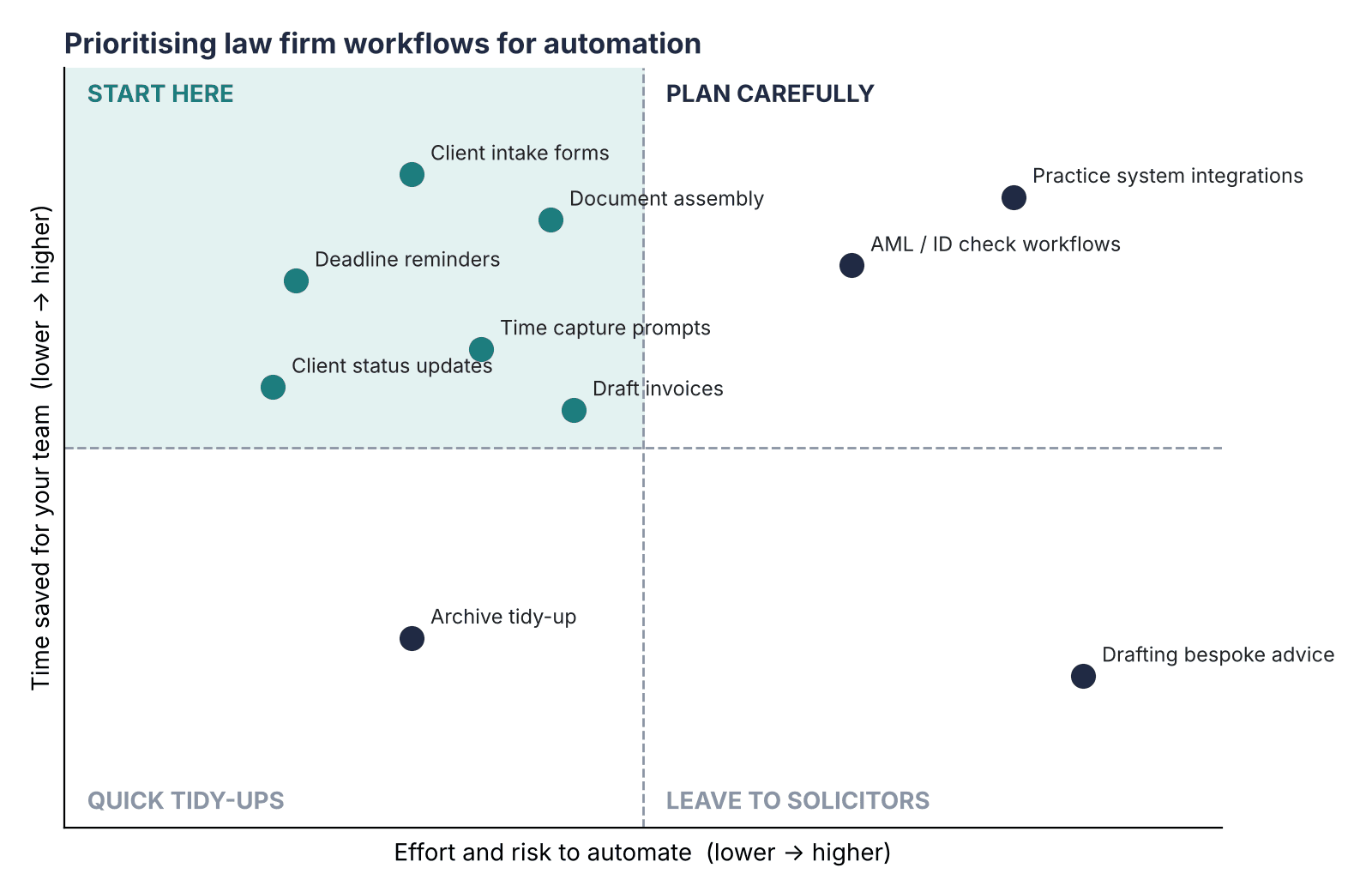
Figure 1: Workflows in the top-left corner are the safest place to begin.
Here is how the most common candidates break down:
Workflow | What automation does | Where a solicitor stays in charge |
|---|---|---|
Client intake | Online forms send details straight into your case system and trigger a conflict-check prompt | Reviews conflicts and accepts the instruction |
Document assembly | Fills engagement letters, standard deeds and routine letters from matter data | Checks content and signs off |
Deadlines and reminders | Creates diary alerts for court dates, limitation periods and transaction timelines | Confirms the dates are right |
Client updates | Sends status messages at set milestones | Writes anything that contains advice |
Time and billing | Prompts fee earners to record time and drafts invoices from it | Approves every bill |
Identity and AML checks | Collects ID, runs each step in order and keeps a record | Reviews flagged or unusual cases |
Client intake and onboarding
Intake is usually the best first project, because every matter starts here.
For example: a small residential conveyancing team receives enquiries through its website. Today, someone retypes the details into the case system, emails an ID request and chases it by phone. With automation, the form creates the matter, sends the ID request, reminds the client after a couple of days and alerts the solicitor once everything is in.
Document assembly
Engagement letters, standard deeds and routine correspondence share a lot of text. Assembly tools pull in names, addresses and dates once, which cuts typos and saves retyping. The solicitor still reads and approves the final version.
Deadlines and reminders
Missed dates carry real consequences in legal work. Automated diary entries and escalating reminders give you a safety net, though a named person should always own each deadline.
How to Automate Business Processes in a Law Firm
Pick one repeatable, low-risk workflow, map how it runs today, automate the simple steps first and keep a solicitor in the approval loop. Pilot it with one team, measure the result and expand from there.
Choose one workflow. Look for high volume, clear rules and low risk. Client intake is a common choice.
Map it as it really runs. Walk through the process with the people who do it. You'll often find steps nobody remembers adding.
Separate rules from judgement. Anything a checklist can handle can be automated. Anything that needs legal reasoning stays with a person.
Check how it connects. The new tool should work with your practice management and document systems, or you'll just create another place to re-key data.
Pilot with one team. Run it alongside the old process for a short period and gather feedback.
Measure and expand. Track time saved, errors avoided and client response times before adding the next workflow.
Confidentiality, Compliance and Risk
Law firms hold some of the most sensitive information a business can handle, so automation needs guardrails from day one. Responsibility for confidentiality and competence stays with the firm and its solicitors, whatever tools you use.
Know where data lives. Understand where each tool stores and processes client information, and who can access it.
Put UK GDPR in place. Use proper data processing agreements with suppliers and limit what personal data each system receives.
Check AI outputs. Treat anything generated by AI as a draft that a qualified person must review.
Keep audit trails. Choose systems that log who did what and when, which helps with both compliance and client queries.
Control access. Give staff only the permissions their role needs.
Common mistakes to avoid
Automating a broken process, which just makes the problem faster.
Buying software before mapping the workflow.
Skipping staff training, so people quietly work around the new system.
Automating client messages that need a personal touch.
When to Bring in a Specialist Partner
Off-the-shelf tools cover a lot of ground. The gaps usually show up when you need several systems to share data, or when a workflow is specific to how your firm operates.
That's where a specialist team such as The Muze Studios can help. The team builds custom AI automations for areas like lead generation, customer service, data analysis and wider business workflows. Those categories map closely to client intake, client communication and reporting in a legal practice.
A good partner will start with your process, not with a tool. They should ask what you do today, where time disappears and what must never be automated. Keep your own compliance lead involved throughout, since a technology supplier can't take on your regulatory duties.
Frequently Asked Questions
How much does business automation cost for a law firm?
Cost depends on scope. Simple workflow tools are usually subscription-based, while custom builds are typically priced per project. Starting with a single-workflow pilot keeps your spend small and shows you the return before you commit further.
Is it safe to automate client data in a law firm?
It can be, provided you control where data is stored, who can access it and how suppliers handle it. Use data processing agreements, access controls and audit logs, and have a solicitor or compliance lead sign off on the setup.
Can small Edinburgh law firms benefit from business automation?
Yes. Small firms often gain the most because fee earners handle their own admin. Automating intake, reminders and routine documents can free up hours without needing a large IT team.
Will automation replace solicitors or support staff?
No. Automation takes over repetitive, rule-based tasks, while legal advice, negotiation and client relationships stay with people. Support staff typically shift toward checking, exceptions and client care.
What should an Edinburgh law firm automate first?
Client intake is usually the best starting point, followed by deadline reminders and document assembly. These workflows are repeatable, easy to measure and low in legal risk.
Conclusion
Business automation works best in law firms when it's focused. Pick one repeatable workflow, keep solicitors in charge of decisions, protect client data and measure what changes. Small, well-chosen wins build confidence for bigger projects.
If you'd like to talk through which workflows to automate first in your practice, you can contact The Muze Studios to discuss your goals and options.

