
Your reception team answers the phone, chases forms, re-types referral details and rings patients who didn't turn up. None of that is clinical work, yet it eats hours that could go to patient care.
If you run a practice, dental surgery, physiotherapy clinic or private health service, business automation in Edinburgh healthcare settings can take much of that repetitive load off your staff. This guide explains what to automate, what to leave to people, how to stay on the right side of data protection law, and how to get started without disrupting your clinic.
What Is Business Automation for Healthcare Clinics?
Business automation uses software to carry out repetitive, rule-based admin tasks without manual effort. In a clinic, that means things like appointment reminders, intake forms, referral routing and payment follow-ups. It handles the paperwork around care, not the care itself.
A good way to think about it: if a task follows the same steps every time, it's a candidate. If it needs clinical judgement or empathy, it stays with your team.
For example, when a patient books online, an automated workflow can send a confirmation, text a reminder 48 hours before, share a pre-visit form, and flag the booking to your practice system. Nobody on your team has to touch it unless something goes wrong.
Where Edinburgh Clinics Typically Lose Time
Most clinics don't struggle with one big problem. They lose time to a dozen small ones that repeat all day. Common examples include:
Missed appointments. Every no-show leaves an empty slot and a gap in your day.
Phone tag. Staff spend long stretches confirming, rescheduling and answering the same questions.
Paper and PDF forms. Patients fill them in at the front desk, and someone then re-enters the details.
Referral handling. Letters and emails arrive in different formats and need sorting by hand.
Chasing payments. Invoices and reminders depend on someone remembering to send them.
Disconnected systems. Booking, records, billing and email don't talk to each other, so information is copied between them.
Each task takes a few minutes. Together, they add up to a significant share of your administrative week.
Which Clinic Tasks Are Worth Automating?
The best tasks to automate are high-volume, repetitive and low-risk, such as reminders, forms and follow-ups. Tasks involving clinical decisions, sensitive conversations or complex exceptions should stay with trained staff. The table below shows a practical split.
Task | What automation can do | What stays human |
Appointment reminders | Send SMS or email reminders and let patients confirm, cancel or rebook in one click | Calls to patients who need extra support |
Patient intake | Send digital forms before the visit and pass answers to the right record | Reviewing answers that need clinical attention |
Referral handling | Log incoming referrals, sort by type and alert the right clinician | Triage and clinical prioritisation |
Recalls and follow-ups | Prompt patients due for a check-up or follow-up visit | Personal outreach in sensitive cases |
Payments | Issue invoices and send polite payment reminders on a schedule | Handling billing disputes or hardship |
Internal alerts | Notify staff when a form is completed or a booking changes | Deciding how to respond to unusual cases |
How to Prioritise Your Automation Projects
You don't need to automate everything at once. Start where the effort is low and the payoff is high. The chart below shows an illustrative ranking for a typical clinic. Your own priorities will depend on your patient mix, systems and staffing.
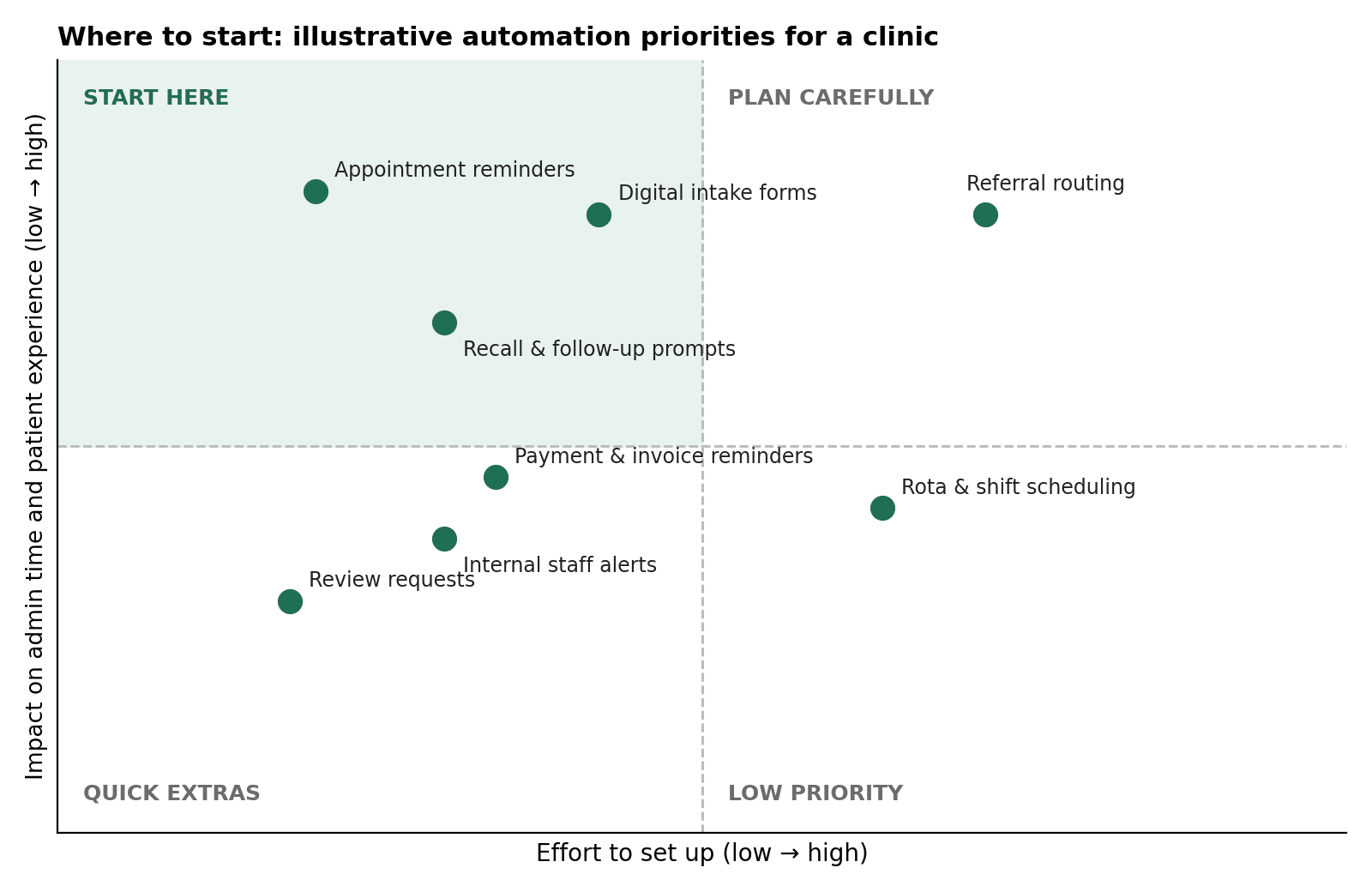
Appointment reminders and digital intake forms usually sit in the "start here" zone. Referral routing often delivers a big benefit, but it needs more planning because it touches several systems and people.
How to Start Business Automation in Your Clinic
Start by mapping one workflow, automating it in a small pilot, and measuring the result before you expand. This keeps risk low and shows your team quickly whether the change works. Follow these steps:
Map the current process. Write down each step of a single workflow, such as booking to appointment, and note who does what.
Pick one high-volume task. Reminders and intake forms are common first choices because the results are easy to see.
Check your data protection position. Confirm what patient data the workflow touches and where it will be stored (more on this below).
Choose tools that connect. Look for software that integrates with your existing booking and records systems rather than adding another silo.
Run a small pilot. Test with one clinician, one service or one location first.
Measure the outcome. Track no-show rates, time spent on admin and patient feedback.
Train and listen to your team. Staff who understand the change will help you improve it.
Data Protection and Compliance: What Edinburgh Clinics Must Consider
Health information is classed as special category data under UK GDPR, which means it needs extra care. Any automation that handles patient details must be designed with that in mind from day one.
Here are the practical points to cover:
Lawful basis. Know why you're processing the data and which condition for processing health data applies.
Data processing agreements. If a software provider handles patient data for you, you need a proper contract with them.
Data location and security. Ask where data is stored, who can access it, and how it's encrypted.
Data minimisation. Collect only what you actually need in forms and workflows.
Impact assessment. For new systems that process health data, a data protection impact assessment is often sensible and sometimes required.
Regulator expectations. Independent healthcare services in Scotland are regulated by Healthcare Improvement Scotland, so make sure any new process fits your existing governance.
This isn't legal advice, so speak to your data protection officer or a qualified adviser before you go live.
Build, Buy, or Hire a Specialist?
Once you know what you want to automate, you have three routes. Each suits a different type of clinic.
Option | Strengths | Watch-outs |
Off-the-shelf tools | Quick to start, lower upfront cost, good for simple needs such as reminders | Limited flexibility and integration, and your workflow may need to bend to fit the tool |
In-house build | Full control over how things work | Needs technical skills, ongoing maintenance and time your team may not have |
Specialist partner | Workflows designed around how your clinic runs, with set-up and ongoing support | Needs a clear brief, and you should check any partner's approach to data security |
Many clinics begin with a simple tool and bring in a specialist when workflows span several systems or need a more tailored set-up. If you'd like help turning a plan like this into working workflows, The Muze Studios can support you with planning and implementation.
What to Look for in a Business Automation Partner
Whether you work with a local Edinburgh team or a remote one, ask the same questions:
Do they ask about your workflows before recommending tools?
Can they explain, in plain language, how patient data is handled and protected?
Will the solution work with the systems you already use?
Do they offer a pilot or phased approach rather than a big-bang launch?
Will they train your team and support you after launch?
Common Mistakes to Avoid
Automating a broken process. Fix the workflow first. Automation will only make a messy process faster.
Skipping the staff conversation. Your team knows where the real bottlenecks are.
Over-automating patient contact. Some conversations need a human voice. Always give patients an easy way to reach a person.
Ignoring measurement. Without a baseline, you can't tell what's working.
Frequently Asked Questions
What is business automation in healthcare?
Business automation in healthcare means using software to handle repetitive administrative tasks, such as reminders, forms and billing follow-ups. It frees staff to focus on patients rather than paperwork. Clinical decisions remain with qualified professionals.
Is business automation safe for patient data?
It can be, provided the tools and workflows are set up in line with UK GDPR. That includes choosing secure providers, signing data processing agreements and collecting only the data you need. Always involve your data protection lead before launch.
Which clinic tasks should I automate first?
Start with high-volume, low-risk tasks like appointment reminders and digital intake forms. They deliver visible results quickly and are easier to test. Move on to referrals and recalls once your team is comfortable.
How much does business automation for a clinic cost?
Costs vary widely depending on the tools, the number of workflows and how much integration is needed. Simple off-the-shelf tools are usually cheaper to start, while tailored workflows involve more upfront work. A specialist can give you a scoped quote after reviewing your processes.
Can small Edinburgh clinics benefit from automation?
Yes. Small clinics often feel admin pressure most because they have fewer staff to share it. Even automating reminders and forms can recover meaningful time each week.
Conclusion
Business automation for Edinburgh healthcare clinics works best when it's focused, careful and built around real workflows. Start with one repetitive task, protect patient data at every step, measure the results, and expand from there.
If you'd like a second pair of eyes on where automation could help your clinic, you can get in touch with The Muze Studios team to talk through your workflows and next steps. You can also learn more about the team on the Muze Studios website.

