Running a shop in Bristol means juggling a lot at once. Stock arrives late, online orders land while you're serving someone at the till, and the spreadsheet you built two years ago is now holding the whole business together.
If that sounds familiar, business automation for Bristol retail businesses is worth a serious look. This guide explains what retail automation involves, which tasks are worth tackling first, and how to start without disrupting the way you trade.
Whether you run one independent shop on Gloucester Road or manage several locations across the city, you'll finish with a clear, practical plan.
What Is Business Automation for Retail?
Business automation for retail means using software to complete repetitive tasks, such as updating stock, sending order emails and syncing sales data, without manual effort. It frees your team to spend time on customers and growth instead of admin. Most retailers begin with a few connected tools rather than one large system.
Automation follows a simple pattern: a trigger starts one or more actions. A customer places an order (the trigger). The system then reduces your stock count, creates a dispatch label and emails the customer a confirmation (the actions). Nobody retypes anything.
It doesn't replace your team. It removes the dull, error-prone jobs they shouldn't be doing by hand, so they have more time for the work customers actually notice, like advice, display and service.
Why Bristol Retailers Are Turning to Automation
Bristol's retail scene is varied. Independent shops and makers trade alongside city-centre destinations such as Cabot Circus and out-of-town centres like Cribbs Causeway. Many sellers also run a website, list on marketplaces and promote through social media.
Selling in several places creates a familiar set of pressure points:
Overselling: a product sells in store but still shows as available online.
Double entry: the same order or invoice gets typed into two or three systems.
Slow replies: customer questions wait until someone has a spare moment.
Month-end admin: bookkeeping becomes a scramble to reconcile sales.
No time for marketing: follow-up emails and promotions slip down the list.
Each of these is a repeatable task, which makes it a good candidate for automation.
Which Retail Tasks Can You Automate?
You don't need to automate everything. These are the areas where most retailers see the clearest benefit.
Stock and inventory
Connect your till, website and marketplace listings so a sale in one place updates stock everywhere. Add low-stock alerts so you hear about a problem before a customer does.
For example: a Bristol homeware shop sells in store and online. A sale at the till automatically lowers the website stock count. When a bestseller drops below a set level, the owner gets an alert with a draft reorder ready to send.
Orders and fulfilment
Automate order confirmations, dispatch labels and shipping notifications. Customers get tracking details without you sending a single email, and your team spends less time copying addresses between systems.
Customer communication
Set up automatic replies for common questions such as delivery times, returns and opening hours. Route anything more complicated to a person. Quick, consistent answers build trust, especially for customers who message outside shop hours.
Marketing follow-up
Welcome emails for new subscribers, reminders for abandoned baskets and post-purchase review requests can all run in the background. Keep them relevant and don't over-send. Marketing automation should feel helpful, not pushy.
Bookkeeping and reporting
Sync sales, fees and refunds into your accounting software so reconciling takes minutes instead of hours. Scheduled reports can also show your best sellers and slowest lines without anyone building them by hand.
How to Decide What to Automate First
The best first project is usually a task that happens often, takes real time and causes mistakes when done by hand. Score each candidate on two things: how much it would improve your week, and how hard it would be to set up.
The chart below shows an illustrative example. Tasks in the top-left corner give the biggest return for the least effort, so they make sound first projects.
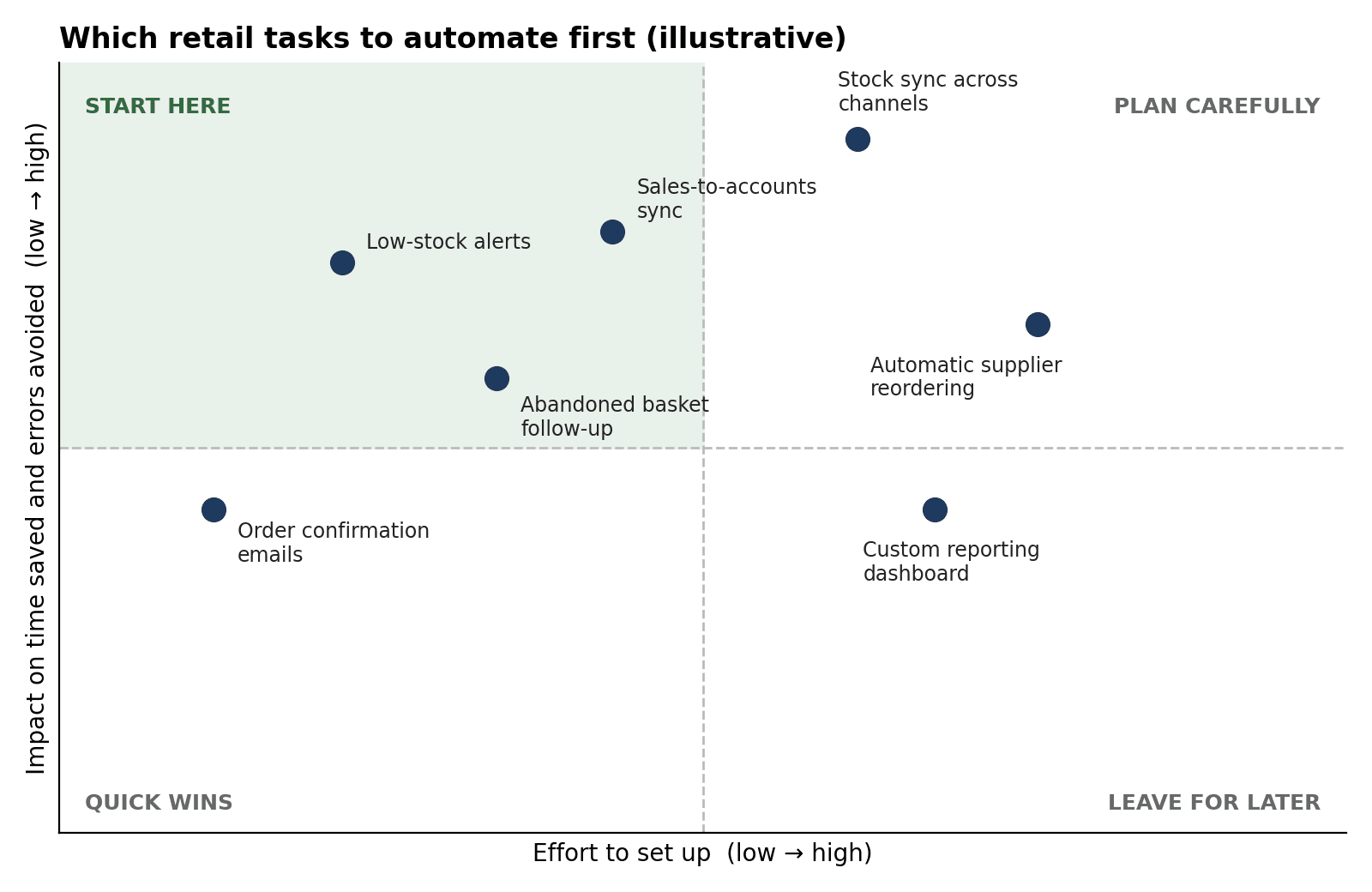
Your own chart will look different. A shop with heavy online sales might put stock sync at the top of the list, while a mostly walk-in business may care more about bookkeeping and supplier reordering.
How to Start With Business Automation in Bristol Retail
Start by listing the tasks your team repeats every week, then pick one with high impact and low effort. Automate that process with simple tools, test it for a few weeks and measure the time saved. Once it works reliably, move on to the next task.
List repeated tasks. Ask your team what they retype, copy or chase every week. Their answers are your shortlist.
Pick one process. Choose a single workflow, such as low-stock alerts, rather than trying to change everything at once.
Check what you already have. Many till systems, e-commerce platforms and accounting tools include built-in automation you may not be using.
Build it small and test it. Run the new workflow alongside the manual one for a short period and compare the results.
Measure the difference. Track hours saved, errors avoided and customer response times, even roughly.
Expand gradually. Add the next workflow only when the first one is stable and your team trusts it.
Common Mistakes to Avoid
Automating a messy process. If a workflow is confusing by hand, automation will only make the confusion faster. Simplify it first.
Buying too many tools. Every extra tool is another login, another bill and another thing to break. Connect what you have before you add more.
Forgetting consent. Marketing emails must follow UK data protection and electronic marketing rules, including having a valid basis to contact people and an easy way to opt out.
Removing the human touch. Automate the routine, but make it simple for customers to reach a real person.
Setting it and forgetting it. Review your workflows regularly, especially after changing suppliers, platforms or products.
Doing It Yourself or Working With a Specialist
There are three common routes, and the right one depends on your time, your tools and how connected your systems need to be.
Approach | Best for | Trade-offs |
Built-in features of your current platforms | Simple jobs like order emails and low-stock alerts | Limited to what each platform offers; tools often don't talk to one another |
No-code connector tools | Linking two or three systems without writing code | Needs someone with time to build, test and maintain the workflows |
Specialist-built workflows | Several channels, bespoke processes or limited in-house time | Higher upfront cost, but less setup time and fewer errors |
If your tools don't connect cleanly or you simply don't have the hours to build and maintain workflows, a specialist team such as The Muze Studios can help you map your processes, choose the right tools and put them in place properly.
Whichever route you take, begin with a clear picture of where time is being lost. That makes any conversation with a provider faster and more useful.
Frequently Asked Questions
How much does business automation cost for a small retailer?
It depends on the route you take. Built-in platform features are often included in your existing subscriptions, no-code connector tools usually charge a monthly fee, and specialist-built workflows are typically scoped and quoted per project.
Which tasks should a Bristol retailer automate first?
Start with tasks that are frequent, time-consuming and prone to errors, such as stock updates, order confirmations and low-stock alerts. These usually deliver quick results with little setup.
Will automation replace my staff?
No. Automation handles repetitive admin, not customer service, merchandising or buying decisions. Most retailers use the time it frees up to improve service and grow sales.
Do I need new software to automate my shop?
Not always. Many existing till, e-commerce and accounting tools already offer automation features. You may only need to switch them on or connect them to each other.
How long does it take to set up retail automation?
A single simple workflow, such as low-stock alerts, can often be running within days. Connecting several systems takes longer because it needs careful testing before you rely on it.
Conclusion
Business automation for Bristol retail businesses isn't about replacing people or buying complicated technology. It's about removing repeated admin so your team can focus on customers. Start with one high-impact task, test it, measure the result and build from there.
If you'd like help working out where to begin, you can contact The Muze Studios to talk through your current setup and the workflows that would make the biggest difference.

