
Your team already knows the pattern. Clients send documents late, someone re-keys the same details into three systems, and a deadline lands while your best people are still chasing paperwork. None of that is advisory work, yet it eats the hours you could spend on it.
That's the problem business automation for Birmingham accountancy firms is meant to solve. This guide explains what automation actually covers, which tasks deliver the quickest wins, how to roll it out without risking client data, and what to look for in a partner.
What Is Business Automation for Accountancy Firms?
Business automation for accountancy firms means using software to run repeatable, rule-based tasks, such as collecting client documents, capturing data, sending reminders and routing work, with minimal manual effort. Your people stay in control of judgement, review and client advice. The software handles the repetitive steps in between.
In practice, it usually combines a few approaches:
Workflow automation: moves a job from one stage to the next and notifies the right person.
System integration: passes data between your practice management, accounting and communication tools, so nobody re-types it.
Document and data capture: pulls figures from invoices, statements and forms into your systems.
Robotic process automation: software "bots" that mimic routine clicks and keystrokes. You can read more about robotic process automation if the term is new to you.
Most practices don't need all four. The right mix depends on the tools you already use and where your team loses the most time.
Why Birmingham Accountancy Firms Are Looking at Automation Now
Birmingham has one of the largest professional services communities outside London, which means firms compete for both clients and skilled staff. Automation helps on both fronts.
Regulatory change: Making Tax Digital for Income Tax is phasing in, and it brings more frequent digital updates for many clients. Manual processes struggle to keep up with that rhythm.
Staffing pressure: Recruiting and retaining qualified accountants is difficult. Removing admin makes each hire go further and makes the work more rewarding.
Client expectations: Clients now expect quick answers, online document sharing and clear status updates.
Margin pressure: Compliance work is price-sensitive. Reducing the time each job takes protects profitability without raising fees.
Which Accountancy Tasks Are Worth Automating?
Look for work that is frequent, rule-based and easy to check. The table below shows common candidates.
Task | What automation can do | What your team still does |
Client onboarding | Sends engagement letters, collects ID and AML details, creates the client record | Reviews risk assessments and approves the client |
Document chasing | Sends scheduled reminders and tracks what's outstanding | Handles difficult or sensitive conversations |
Bookkeeping data entry | Captures invoice and receipt data and matches bank feeds | Checks exceptions and unusual items |
Month-end reporting | Compiles standard report packs from accounting data | Adds commentary and advice |
Deadline tracking | Flags upcoming filing dates and assigns tasks automatically | Prioritises workload and signs off |
Invoicing and billing | Generates recurring invoices and payment reminders | Agrees fees and handles disputes |
For example: A five-partner practice in the city centre sends the same document request to every client each quarter. Staff spend hours writing emails and checking who has replied. An automated reminder sequence sends the requests, logs the replies and alerts a team member only when something is still missing.
How to Decide What to Automate First
Don't start with the most impressive project. Start with the one that saves the most time for the least effort and carries the lowest risk. The chart below shows how many practices think about it.
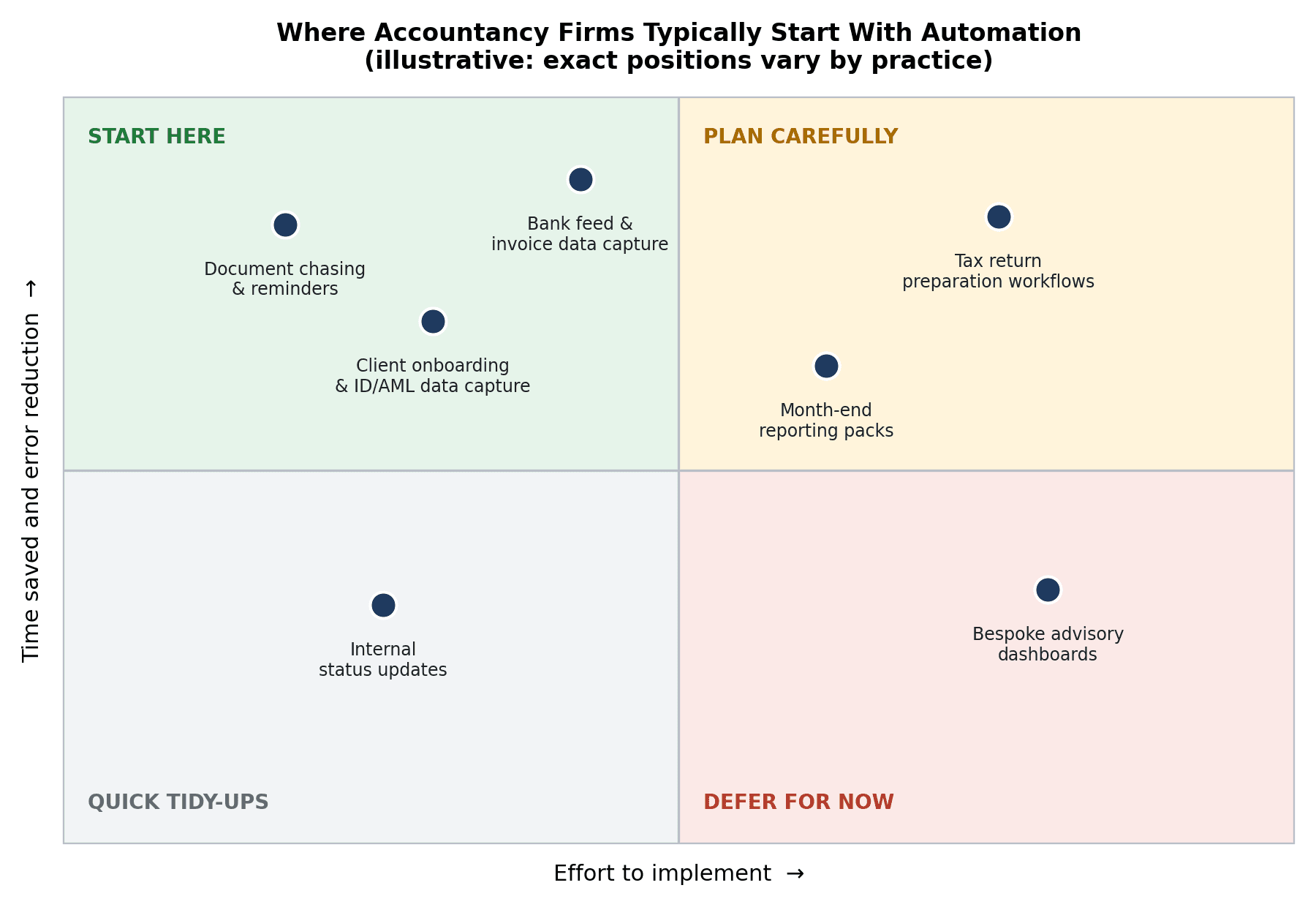
Tasks in the top-left quadrant, such as document chasing and onboarding, are usually the best starting point. Tax return workflows can deliver a lot of value, but they need more planning, testing and sign-off.
Use these three questions to test any candidate:
Is it repetitive? If your team does it the same way every time, it's a good fit.
Are the rules clear? If a new starter could follow a checklist, software can too.
Is the outcome easy to verify? You should be able to spot an error quickly.
How to Implement Business Automation in an Accountancy Practice
Start by mapping one workflow end to end, then automate the repetitive steps while keeping a human checkpoint before anything reaches a client or HMRC. Test with a small group of clients first, then expand once the results are reliable.
A practical sequence looks like this:
Map the current process. Write down every step, who does it and which systems it touches. You'll often find steps nobody needs.
Choose a single workflow. One clear win builds confidence and shows your team what's possible.
Tidy your data. Automation magnifies messy records. Fix duplicates, naming and missing fields first.
Build in review points. Decide where a person approves, especially for filings, advice and anything client-facing.
Pilot with a small group. Run the new process alongside the old one for a cycle and compare results.
Train, measure and refine. Track time saved, errors caught and client feedback, then adjust before you scale.
Protecting Client Data and Meeting Your Obligations
Accountancy firms handle some of the most sensitive information a client owns, so security can't be an afterthought. Any automation should work within UK GDPR and your professional confidentiality duties.
Limit access so each tool and user sees only what they need.
Keep an audit trail showing what was changed, when and by whom.
Check where data is stored and which third parties can reach it.
Document the process so your compliance lead can review it.
Common Automation Mistakes to Avoid
Automating a broken process. Fix the workflow first. Otherwise you'll just make the problem run faster.
Trying to do everything at once. Large rollouts overwhelm teams and make problems hard to trace.
Removing human review. Automation should reduce routine work, not replace professional judgement.
Ignoring your team. Staff who understand the process spot problems early and help it stick.
Buying tools before defining the problem. Software should follow the workflow, not dictate it.
Choosing a Business Automation Partner in Birmingham
Some firms build automations in-house, particularly when they have a technically minded team member. Many find that a specialist partner saves time and avoids costly mistakes, especially once several systems need to talk to each other.
Whichever route you take, look for a partner who:
Starts by understanding your workflows rather than pitching a tool.
Explains clearly how data is handled and secured.
Builds in review steps and documents what they've created.
Offers support after launch, not just a one-off build.
Can work with the accounting and practice management software you already use.
If you'd like help turning your list of repetitive tasks into a working system, a specialist team such as The Muze Studios can help you map your workflows and move from planning to execution. If you're ready to talk through your own practice, you can contact The Muze Studios team to discuss where automation would make the biggest difference.
Frequently Asked Questions
What is business automation for accountancy firms?
It's the use of software to handle repeatable tasks like onboarding, document collection, data entry and reminders. Accountants still review and approve the work that needs professional judgement.
Which accountancy tasks should Birmingham firms automate first?
Start with high-volume, rule-based tasks such as client onboarding, document chasing and data capture. They usually save the most time with the least risk and are easy to check.
Is business automation safe for client data?
It can be, provided it's set up with proper access controls, audit trails and UK GDPR compliance in mind. Always check where data is stored and who can access it before you connect any system.
How long does it take to implement automation in an accountancy practice?
A single, well-defined workflow can often be piloted within weeks, while a broader rollout takes longer. The timeline depends on your data quality, the number of systems involved and how much testing you need.
Will automation replace accountants?
No. Automation removes repetitive admin, while advice, judgement and client relationships remain human work. Most firms use the time saved to focus on advisory services.
Conclusion
Business automation works best in accountancy when it starts small, targets repetitive tasks and keeps people in charge of the decisions that matter. Pick one workflow, tidy the data behind it, build in review points and measure the result before you scale.

