If you run a freight, warehousing or transport business in Durban, you already know where the hours go. Someone retypes a booking into three systems. Someone chases a proof of delivery. Someone builds an invoice from a pile of loose paperwork.
That work keeps your operation moving, but it doesn't have to be done by hand. Business automation in Durban logistics means using software and rules to handle repeatable tasks so your people can focus on exceptions, customers and growth.
This guide explains what automation looks like in a logistics company, which processes to tackle first, and how to start without disrupting your daily operation.
What Is Business Automation for Logistics Companies?
Business automation for logistics companies is the use of software to run repeatable tasks, such as bookings, documentation, dispatch updates and invoicing, with little or no manual input. Data is captured once and flows between systems automatically. Your team steps in only when something needs a decision.
It's different from buying a single piece of software. Automation connects the tools you already use, such as your transport management system, accounting package, email and spreadsheets, so they pass information to each other without someone copying and pasting.
For example: a customer submits a booking form. The details create a job record, generate the delivery note, notify the dispatcher and add a draft line to the invoice. Nobody retypes anything.
Why Business Automation Matters for Logistics in Durban
Durban sits at the centre of a demanding supply chain. The port handles a large share of South Africa's container and bulk cargo, and the N3 corridor carries freight inland to Gauteng and beyond. Operators here work with tight vessel windows, customs requirements and customers who expect real-time answers.
Manual processes struggle under that pressure. Three problems come up again and again:
Delays between steps. Information waits in someone's inbox before the next team can act on it.
Repeat data entry. Every retype is a chance for a wrong container number, address or weight.
Limited visibility. Managers can't see where a job stands without phoning around.
Automation tackles these directly. It removes the waiting, reduces avoidable errors and gives you a live picture of the operation.
Where Automation Fits in Your Shipment Workflow
Most logistics businesses follow a similar path from enquiry to payment. Each stage has tasks that can be automated. The chart below shows the common opportunities along that path.
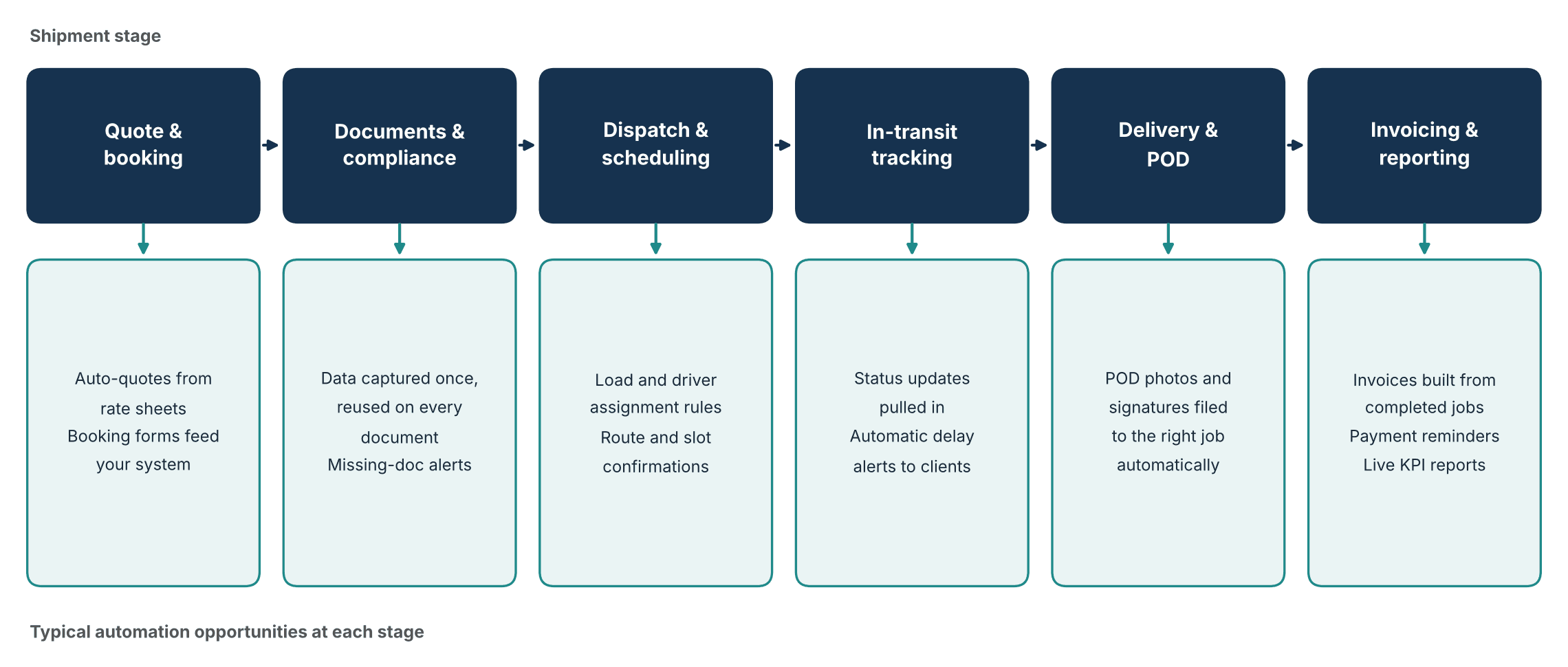
Automation opportunities across the shipment lifecycle
You don't need to automate every stage at once. The best starting point is usually wherever your team loses the most time or makes the most mistakes.
Six Processes Logistics Companies Can Automate First
1. Quoting and booking
Quotes often depend on rate sheets, distance, weight and service level. Automation can calculate a quote from those inputs and send it to the customer in minutes. Accepted quotes then become booking records without re-entry.
2. Documentation and compliance
Delivery notes, packing lists and customs-related documents repeat the same data. Capture it once and let the system populate every document. You can also set alerts when a required document is missing before a shipment moves.
3. Dispatch and scheduling
Rules can match loads to vehicles and drivers based on capacity, location and availability. Drivers and customers then receive automatic confirmations. Your dispatcher handles the exceptions instead of every single job.
4. Tracking and customer updates
Customers ask "where's my cargo?" more than almost any other question. Pull status updates from your tracking data and send them automatically. Add delay alerts so clients hear bad news from you first.
5. Proof of delivery
Drivers capture a signature or photo on a phone. The system files it against the right job and triggers the next step, usually invoicing. This removes the paper chase and the weeks-long gap between delivery and billing.
6. Invoicing and reporting
Completed jobs can produce invoices automatically and send payment reminders on a schedule. The same data feeds dashboards that show on-time delivery, cost per job and outstanding debtors. You stop building month-end reports by hand.
Manual vs Automated Logistics Operations
The difference shows up in day-to-day work. Here's how the two approaches compare across the areas that matter most.
Area | Manual process | Automated process |
|---|---|---|
Data entry | Retyped across emails, spreadsheets and accounting software | Captured once and shared between systems |
Customer updates | Staff call or email for each status request | Updates sent automatically at key milestones |
Documents | Built individually, with missing items found late | Generated from job data with missing-item alerts |
Invoicing | Delayed until paperwork arrives | Triggered when proof of delivery is received |
Visibility | Managers rely on phone calls and spreadsheets | Live view of jobs, delays and KPIs |
Scaling | More volume means more admin staff | More volume runs through the same workflows |
How to Start Automating Your Logistics Business
Start by mapping your current process, choosing one high-impact workflow, and automating that before expanding. Test it with a small group, measure the results, then move to the next stage. Small, staged wins carry less risk than a full system overhaul.
Map how work flows today. Walk through a shipment from enquiry to payment. Note every handoff, retype and wait.
Find the pain points. Look for tasks that repeat daily, cause errors or delay cash flow.
Pick one workflow to start. Choose something frequent and well-defined, such as proof of delivery to invoicing.
Audit your current tools. Check what your existing software can already connect to before buying anything new.
Pilot and measure. Run the automation on a limited set of jobs. Track time saved, errors and customer feedback.
Train your team and expand. Show staff how the new process works and what stays manual, then move to the next workflow.
Common Mistakes to Avoid
Automating a broken process. Fix confusing steps first. Automation makes a bad process faster, not better.
Trying to do everything at once. Large rollouts overwhelm staff and make problems hard to trace.
Ignoring your team. Dispatchers and admin staff know where the real bottlenecks are. Involve them early.
Skipping the exceptions. Decide how late loads, damaged cargo and missing documents will be handled, because they're part of the real workflow.
Forgetting data quality. Automation spreads whatever data it receives. Clean customer, rate and address records before you start.
Choosing a Partner for Business Automation in Durban
Plenty of logistics firms can handle small fixes in-house. Larger projects, such as connecting several systems or redesigning a workflow, usually need outside help.
When you assess a partner, look for these qualities:
They ask about your operation before proposing a tool.
They can work with the software you already use.
They roll out in stages and report on results.
They explain what they're building in plain language.
If you'd like help turning a process map into working systems, you can speak with The Muze Studios about how automation could fit your operation. A short conversation about your current workflow is usually enough to identify where to begin.
Frequently Asked Questions
What is business automation for logistics companies?
It's the use of software to handle repeatable tasks like bookings, documents, dispatch updates and invoicing with minimal manual input. Data moves between systems automatically, so staff only step in for exceptions.
Which logistics processes should Durban companies automate first?
Start with high-volume, rule-based tasks that cause delays or errors. Proof of delivery to invoicing, customer status updates and document generation are common first choices because the results are quick to see.
Do I need to replace my current software to automate?
Not usually. Many automation projects connect the tools you already use, such as your transport management system, accounting software and email. Replacement is only needed if your current tools can't be integrated.
How long does it take to see results from logistics automation?
A focused first workflow can often be piloted within weeks, depending on how many systems are involved. Wider results build up as you automate more stages, so a staged rollout works best.
Conclusion
Automation doesn't have to be a huge project. For Durban logistics companies, the practical route is to map your workflow, pick the stage that costs you the most time, and automate that first. Proof of delivery, documents and invoicing are often the quickest wins.
Each improvement frees up your team, shortens the time between delivery and payment, and gives customers the visibility they expect. If you're ready to look at your own operation, contact The Muze Studios to talk through where automation could help most.

