Your front desk is ringing, your receptionist is writing in a paper register, and a patient who booked for 10:00 am still hasn't shown up. Meanwhile, your doctor is waiting and the next patient is getting restless. If this sounds familiar, you don't have a staffing problem. You have a process problem.
That's where business automation in Abuja healthcare settings is gaining ground. Clinics are using software to handle repetitive admin tasks, so staff can focus on patients instead of paperwork. This guide explains what clinics can automate, how to roll it out step by step, and what to watch for before you commit.
Why Abuja Clinics Are Looking at Automation
Most private clinics run on a mix of paper files, WhatsApp messages, phone calls and spreadsheets. That works when you see ten patients a day. It starts to break at forty.
The usual pain points look like this:
No-shows and late cancellations that leave gaps in the doctor's schedule.
Long queues at reception while staff re-enter the same patient details by hand.
Slow billing and unclear records of who has paid, who owes, and which HMO claims are pending.
Lost follow-ups, because nobody has time to remind patients about test results or repeat visits.
Stock surprises, such as running out of consumables on a busy day.
Each problem is small on its own. Together, they cost your clinic time, revenue and patient trust.
What Is Business Automation for Healthcare Clinics?
Business automation for healthcare clinics means using software to carry out repetitive administrative tasks, such as booking, reminders, intake and billing, without manual effort each time. It doesn't replace clinical judgement. It removes routine admin so your team has more time for patient care.
Think of it as a set of "if this happens, do that" rules. When a patient books an appointment, the system sends a confirmation. If they don't confirm a day before, it sends a reminder. After the visit, it sends a follow-up message and creates an invoice.
Automation can be as simple as scheduled messages or as complete as a custom clinic management platform. The right level depends on your size, budget and workflow.
Which Clinic Tasks Can You Automate?
Not every task is worth automating. The best candidates are repetitive, rule-based and time-consuming. The table below shows common examples.
Task | What automation does | Main benefit |
|---|---|---|
Appointment booking | Lets patients pick a slot online or by chat, then updates the doctor's calendar automatically | Fewer phone calls and double bookings |
Reminders | Sends SMS or WhatsApp reminders before each visit | Fewer no-shows |
Patient intake | Collects personal details and medical history through a digital form before arrival | Shorter queues, cleaner records |
Billing and invoicing | Generates invoices, records payments and flags overdue balances | Faster payment, fewer errors |
HMO claims tracking | Logs each claim, its status and follow-up dates | Less lost revenue |
Follow-ups and recalls | Messages patients for check-ups, repeat prescriptions or test results | Better patient retention |
Inventory alerts | Notifies staff when consumables fall below a set level | No stockouts on busy days |
Appointment booking and reminders
This is usually the best place to start. For example: a clinic in Wuse books 30 appointments a day, and the receptionist spends part of each morning calling to confirm them. An automated reminder system does that job in the background, and patients can reply to confirm or reschedule.
Patient intake and records
Instead of filling forms in the waiting room, patients can complete them on their phones before they arrive. The details flow straight into the patient record, so your staff don't type the same information twice.
Billing, invoicing and HMO claims
Many clinics lose track of payments because records sit in different places. A simple automated billing flow creates an invoice at the end of each visit, records how it was paid and flags anything outstanding. For HMO patients, a claims tracker shows what's been submitted and what's still waiting.
Follow-ups and patient communication
Patients return to clinics that remember them. Automated check-in messages after treatment, reminders for repeat visits and seasonal health notices keep your clinic in touch without adding to your team's workload.
How to Automate a Healthcare Clinic Step by Step
Start by mapping your current workflow, then automate the single task that wastes the most time. Test it with your team for a few weeks before adding more. Small, steady rollouts work better than one big switch.
Map what happens today. Follow a patient from first contact to payment. Note every handoff, delay and repeated entry.
List your biggest time-wasters. Ask your front desk, nurses and billing staff where they lose the most time.
Pick one task to automate first. Choose something frequent and simple, such as appointment reminders.
Set a clear goal. For example, "reduce no-shows" or "cut check-in time." You can't judge success without one.
Choose the right tool or partner. Decide whether an off-the-shelf tool fits, or whether your workflow needs something built around it.
Train your staff. Even good software fails if the team doesn't trust or understand it.
Review and expand. After a few weeks, check the results, fix what's not working and move to the next task.
A simple way to prioritise
If you can't decide where to begin, compare each task by the effort it takes and the impact it has. The chart below shows a typical pattern for small and mid-sized clinics. Your own results will vary with your setup.
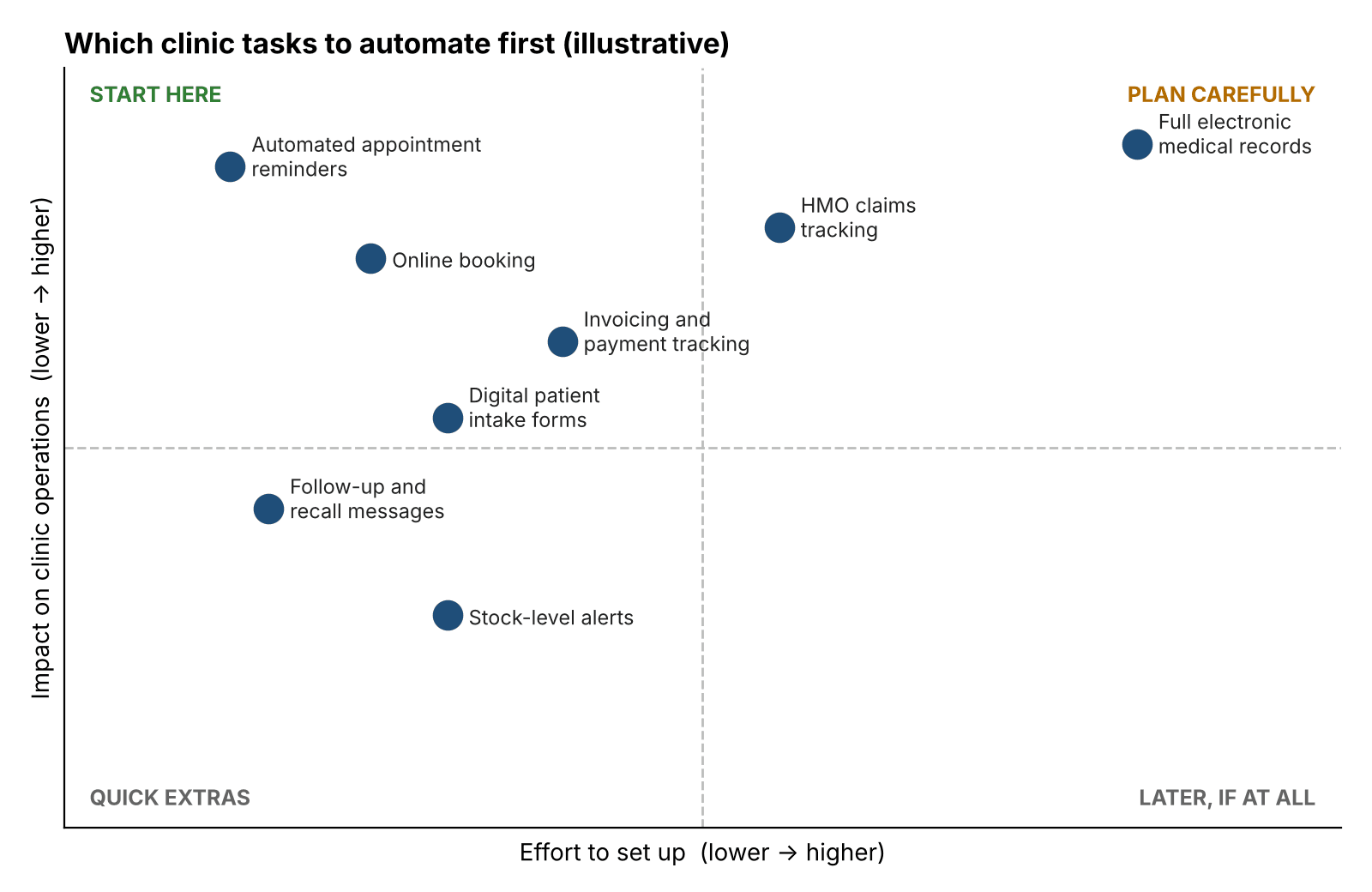
Illustrative prioritisation of common clinic automation tasks. Positions are indicative, not measured data.
Reminders, online booking and billing sit in the "start here" zone because they're quick to set up and noticeably reduce daily friction. Full electronic medical records can deliver a lot, but they need careful planning, training and data migration.
What to Check Before You Automate
Patient data privacy
Health information is sensitive. Nigeria's Data Protection Act 2023 sets rules for how organisations collect, store and use personal data, and health data is treated with extra care. Make sure any system you use limits access by role, protects stored data and records patient consent.
Power and internet reliability
Plan for outages. Choose tools that work on mobile data, save progress when the connection drops and let staff continue with a simple fallback process.
Integration with what you already use
New tools should fit your existing workflow. If your team has to double-enter information between systems, you've added work instead of removing it.
Staff adoption
Involve your receptionists and nurses early. They know where the real bottlenecks are, and they'll use the system more willingly if they helped shape it.
Off-the-Shelf Tools or Custom Automation?
Ready-made tools are cheaper to start with and work well for standard needs like reminders or basic scheduling. Their limits show up when your clinic has its own workflow, multiple branches or specific billing rules.
Off-the-shelf tools | Custom automation | |
|---|---|---|
Setup speed | Fast | Slower, but built around you |
Upfront cost | Usually lower | Usually higher |
Fit for your workflow | Partial; you adapt to the tool | Strong; the tool adapts to you |
Connecting several systems | Often limited | Designed for it |
Best for | Single clinics with simple needs | Growing clinics and multi-branch groups |
If your clinic has outgrown generic tools, a specialist team can design the system around your actual workflow. The Muze Studios builds custom software and automation for businesses, and that kind of partner can help you move from a list of ideas to a working system. Whichever route you choose, start with one clear problem and build from there.
Ready to Take the Next Step?
You don't need to automate everything at once. Identify the one task that frustrates your team most, set a measurable goal and start there.
If you'd like to talk through your clinic's workflow with a team that builds these systems, you can contact The Muze Studios to discuss what automation could look like for your practice.
Frequently Asked Questions
What is business automation for a healthcare clinic?
It's the use of software to handle repetitive admin tasks like booking, reminders, patient intake and billing. It reduces manual work and errors so your staff can spend more time with patients.
Which clinic processes should I automate first?
Start with appointment reminders and online booking. They're quick to set up, easy for patients to use and often reduce no-shows and phone traffic right away.
How much does business automation cost for a clinic in Abuja?
Cost depends on what you automate and how much customisation you need. Simple reminder tools cost far less than a custom clinic management system, so define your priorities first and request a quote based on them.
Is it safe to store patient data in automated systems?
It can be, if the system uses role-based access, secure storage and proper consent practices. Check that your setup respects the Nigeria Data Protection Act 2023 before you go live.
Do small clinics really need automation?
Not always everything, but most benefit from automating at least one task. Even small clinics lose time to manual reminders, paper forms and scattered payment records.
Conclusion
Business automation in Abuja healthcare clinics isn't about adopting technology for its own sake. It's about removing the repetitive admin that slows your team down and frustrates your patients.
Map your workflow, pick one high-impact task, measure the result and expand from there. If you want help building a system that fits how your clinic really works, the team at The Muze Studios is a good place to start the conversation.